
A website audit isn't just a technical checklist; it's a strategic roadmap for your most valuable digital asset. Think of it as a comprehensive health check-up for your online presence, designed to diagnose hidden problems and uncover powerful opportunities for growth. When done right, an audit transforms ambiguity into an actionable plan that directly impacts your bottom line.
Why Auditing Your Website Is a Non-Negotiable Strategy

Imagine your website is your top-performing salesperson, working 24/7. An audit is the performance review that ensures they're at the top of their game. It connects your website's performance directly to your core business goals, moving you from guesswork to data-driven decisions. In my experience, this systematic review is the single most effective way to pave new roads for growth.
Without regular audits, your website could be silently bleeding revenue. Seemingly minor issues—a slow-loading page, a few broken links, confusing navigation—compound over time. This friction leads to frustrated visitors, sinking search rankings, and ultimately, lost sales. An audit gives you a clear, data-backed roadmap to fix what's broken and amplify what's already working.
Uncovering Hidden Opportunities
A truly comprehensive audit isn't just about spotting errors. It’s about understanding how real people interact with your site, whether your content is actually resonating with your ideal customers, and how you truly stack up against your competitors.
This process delivers critical insights that sharpen your entire strategy:
- Improved Search Visibility: Fixing underlying SEO problems is the fastest way to climb the rankings and attract more qualified organic traffic.
- Enhanced User Experience (UX): By smoothing out rough patches in the customer journey, you’ll see higher engagement, stronger brand loyalty, and better conversion rates.
- Increased ROI: An audit helps you focus your budget and team's energy on improvements that will actually move the needle, ensuring your efforts lead to tangible business results.
An audit transforms ambiguity into action. It provides the clarity needed to make informed decisions, turning your website from a passive brochure into an active, high-performing engine for business growth.
The Statistical Imperative for Audits
In a market where Google commands over 91% of the worldwide search engine share, according to data from Statcounter, a website audit isn't just a good idea—it's a statistical necessity. For many businesses, organic search drives over 51% of all website traffic, meaning even minor technical hiccups can cause a major drop in visibility and revenue.
Consider this: businesses on the first page of Google often see average conversion rates around 32.5%. Every single ranking position counts. This is why many companies are still trying to determine if SEO is worth it for their business, but the data consistently proves its immense value.
Setting the Stage for a Successful Website Audit
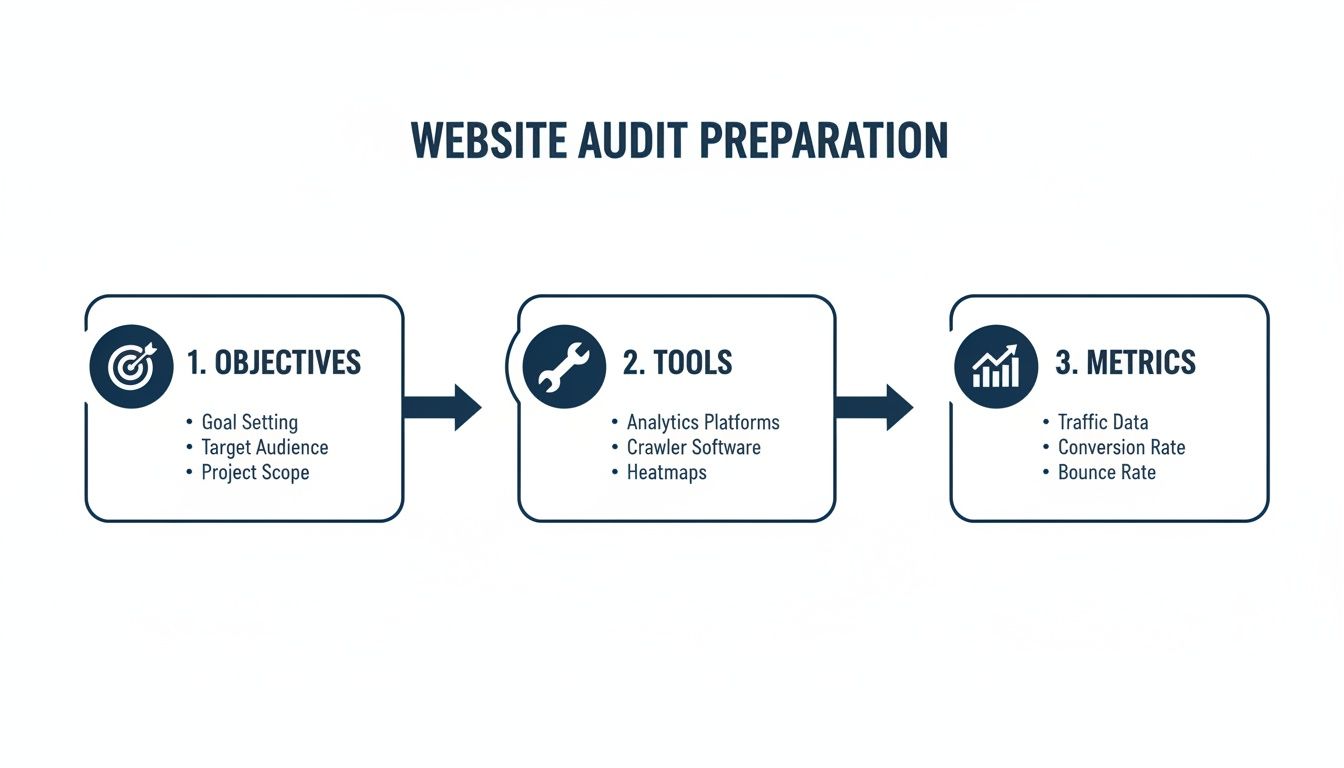
Before you run a single scan, the most crucial work happens away from the keyboard. The success of any audit hinges on crystal-clear objectives. If you dive in without a specific goal, you'll quickly drown in data with no clear path forward.
Start by asking the big question: what business problem are we trying to solve? Perhaps you've seen a sudden, unnerving drop in organic traffic. Maybe your e-commerce store is plagued by abandoned carts, or your local business just isn’t generating the quality leads it needs. Pinpointing a precise goal focuses your audit on the actions that will actually make a difference.
Defining Your Audit Goals
Your objectives are your North Star—they dictate the scope and direction of the entire audit. A vague goal like "improve SEO" is a recipe for wasted effort. In contrast, a goal like "increase organic leads from our top 10 service pages by 15% in the next quarter" provides a clear, measurable target. That level of specificity is everything.
Practical Example: An e-commerce site might focus its audit on shaving milliseconds off product page load times and simplifying the checkout flow to reduce cart abandonment. A B2B software company, however, would likely concentrate on finding content gaps to attract more top-of-funnel traffic and optimizing its demo request forms to convert more visitors into sales opportunities.
A well-defined goal elevates your audit from a simple technical checklist to a powerful strategic initiative. It’s what ensures every finding is weighed against its potential to impact the KPIs that truly matter to the business.
Assembling Your Audit Toolkit
With your goals locked in, it's time to gather your tools. Getting this sorted out upfront saves headaches and maintains momentum. For a comprehensive audit, you'll need a few key platforms to see the full picture.
Here’s what your essential toolkit should look like:
- Google Analytics: This is your window into user behavior, traffic sources, and conversions. It’s non-negotiable for understanding what is happening on your site.
- Google Search Console: This provides intelligence straight from Google. It shows you how the search engine views your site, from indexing status and keyword performance to critical errors and security issues.
- An SEO Crawler: You absolutely need a powerful crawler. Tools like Ahrefs, Semrush, or the industry-staple Screaming Frog are indispensable for a deep technical dive. They act like a search engine, systematically crawling your site to uncover issues like broken links, redirect chains, and duplicate content at a scale you could never manage manually.
Establishing Baseline Metrics
The final piece of prep work is to take a snapshot of your current performance. Before you change a single thing, you must document your starting point. This "before" picture is the only way you’ll be able to measure the real impact of your audit and the fixes you implement.
Based on your goals, identify and record the key metrics that matter. If your objective is to drive more organic traffic, your baseline report might include:
- Total organic sessions per month
- Current keyword rankings for your top 20 target terms
- Average click-through rate (CTR) from search results
- The total number of pages indexed, as reported in Google Search Console
This data is your benchmark. Without it, you’re flying blind and will have no concrete way to prove that your hard work delivered a positive ROI. This foundational step is what ensures your audit is a measurable driver of growth, not just an academic exercise.
2. Auditing Your Technical SEO Foundation
Now that the prep work is done, it's time to roll up our sleeves and dive into the nuts and bolts of your website. I always start with the technical foundation. Think of this as the plumbing and wiring of your site—it's not glamorous, but if it's not right, nothing else matters.
At its core, technical SEO boils down to two key questions: Can search engines find your content (crawlability)? And can they understand and add it to their database to show to users (indexability)? Getting this right is non-negotiable. Specialized technical SEO audits are built around diagnosing and fixing these foundational issues.
Can Search Engines Even Find Your Content?
Before worrying about keywords or content quality, you must confirm that search engine bots are allowed in the door. The first stop is your robots.txt file. This small but mighty file in your site's root directory gives crawlers their marching orders.
A single typo here can be catastrophic, accidentally blocking Google from your entire site. You need to check for any overly broad Disallow: rules that are locking out important sections. For a comprehensive look at how to handle this file correctly, it's worth reviewing some established robots.txt best practices.
Next, go straight to the source: Google Search Console. The Coverage report (under 'Indexing') is your direct line to Google. It shows you exactly what's been indexed and, more importantly, what hasn't and why.
Look for these common red flags:
- "Crawled – currently not indexed": Google saw the page but didn't deem it worthy of indexing. This often points to thin or duplicate content.
- "Discovered – currently not indexed": Google knows the page exists but hasn't crawled it yet. This can signal that your site is too large or slow for its assigned crawl budget.
- "Blocked by robots.txt": This is direct confirmation that your instructions are preventing Google from accessing the URL.
A well-defined plan, as outlined below, ensures these technical checks are purposeful and tied directly to your business goals.
Is Your Site Architecture Helping or Hurting You?
Once you've confirmed search engines can access your site, you need to look at how it's put together. A clean, logical site architecture is a massive advantage for both users and search engines. I always aim for a "flat" structure, where any page on the site is no more than three or four clicks away from the homepage.
This structure helps spread ranking authority (often called "link equity") more evenly and ensures crawlers can easily discover all your important pages. Here, a tool like Screaming Frog or Ahrefs is indispensable for spotting structural flaws.
Expert Insight: Broken internal links are one of the most common—and easily fixable—technical issues I find. A single 404 error on a major navigation page can cut off entire sections of your site from users and crawlers, wasting authority and creating a dead-end experience. Fixing these is a quick win with a big impact.
While you're at it, hunt for redirect chains. This happens when Page A redirects to Page B, which then redirects to Page C. Each hop in the chain leaks a bit of SEO value and slows down the user experience. The goal is a single, direct 301 redirect from the old URL to the final one.
Finally, tackle any canonicalization issues. The rel="canonical" tag is your way of telling Google which URL is the "master" version when you have duplicate or similar content. This is a lifesaver for e-commerce sites with filters that generate dozens of URLs for the same product list. Without it, you're splitting your SEO signals and watering down your ranking power.
To help you get started, here's a quick checklist of the core technical areas to cover.
Core Technical SEO Audit Checklist
This table provides a high-level overview of the essential checks, the go-to tools for each, and what a "good" result looks like.
| Audit Area | Tool to Use | What to Look For | Healthy Sign |
|---|---|---|---|
| Crawlability | Your robots.txt file |
Overly broad Disallow: directives |
Important pages & directories are allowed |
| Indexability | Google Search Console | High number of "Excluded" pages | Most submitted pages are indexed |
| Site Structure | Screaming Frog, Ahrefs | Pages deeper than 4 clicks from home | A "flat" architecture (3-4 clicks deep) |
| Internal Links | Screaming Frog, Sitebulb | 404 errors, broken redirects | All links return a 200 OK status code |
| Redirects | Ahrefs, Screaming Frog | Redirect chains (e.g., 301 > 301 > 200) | Single-step redirects (301 > 200) |
| Canonicals | Screaming Frog, View Source | Missing or incorrect rel="canonical" tags |
Canonical tags point to the preferred URL |
Getting these fundamental elements right creates a stable, resilient foundation. With this in place, all the other on-page and off-page SEO work you do will be far more effective.
Analyzing On-Page SEO and User Experience

With a solid technical foundation, it's time to focus on what your visitors—and Google's crawlers—actually see. On-page SEO is the art and science of aligning your content with what people are searching for, turning each page into a magnet for your ideal audience.
Think of it as the bridge between search engine logic and human value. Get this right, and you don't just see better rankings; you see more engagement, more trust, and more conversions. After all, a poor on-page experience is a deal-breaker. Research shows that up to 88% of users are less likely to return to a site after a bad first impression, proving that content and layout are just as crucial as the code.
Crafting Compelling Titles and Descriptions
On a crowded search results page, your title tag and meta description are your first handshake. They function as a digital billboard, and optimizing them is one of the highest-impact tasks in any audit.
The title tag is arguably the single most important on-page factor. It must be sharp and concise—ideally under 60 characters—and feature your primary keyword. More importantly, it has to give someone a compelling reason to click. A generic title like "Plumbing Services" is forgettable. But "24/7 Emergency Plumbing Repair in [City] | Upfront Pricing" speaks directly to an urgent need and builds trust before the user even lands on your page.
While the meta description isn't a direct ranking factor, it's your sales pitch. It’s your chance to expand on the title, use persuasive language, and tell the user why your page is the best answer.
- Weak Meta Description: "We offer a variety of marketing services for small businesses. Contact us today to learn more about our packages."
- Strong Meta Description: "Need more leads? Our proven marketing strategies for small businesses drive real growth. Get a free, no-obligation proposal in 24 hours!"
Key Takeaway: Treat your title tags and meta descriptions as advertisements for your content. Every character should work to convince a user that your page holds the best answer to their query. This is a crucial step when you conduct a website audit that aims for a higher click-through rate.
Evaluating Content Quality and Structure
Once a visitor clicks through, your content has to deliver on the promise you made. During an audit, you need to be ruthless. Is the content truly valuable, relevant, and well-structured?
Start by hunting for "thin content"—pages with little substance that offer no unique value. Search engines tend to view these as low-quality, and they can drag down the authority of your entire site. A classic example is an e-commerce category page that's just a grid of products. Adding a helpful paragraph or a mini buyer's guide can transform it from a liability into an asset.
Proper header structure (H1, H2, H3) is also vital for both crawlers and humans. Your page should have one, and only one, H1 tag that reflects the page's main topic. From there, H2s and H3s break down the content into logical, scannable sections. This not only clarifies the page's hierarchy for search engines but also makes it far easier for people to read.
Connecting On-Page Elements to User Experience
Ultimately, you can't separate on-page SEO from user experience (UX). They are two sides of the same coin. A page might be perfectly optimized for a keyword, but if it’s a nightmare to navigate, people will leave. That "bounce" is a powerful negative signal to Google.
So, put yourself in the user's shoes. Is the navigation intuitive? Is the information easy to find? A confusing menu or a broken internal link can kill a conversion in its tracks. Readability is another big one. Are you confronting visitors with massive walls of text? Usability experts have known for years that clear, concise writing is fundamental. For a deeper dive, government resources like the guide on improving user experience offer excellent principles on plain language.
Finally, look at your calls-to-action (CTAs). Every page should have a purpose and guide the user to the next logical step, whether that's "Buy Now," "Request a Demo," or "Read More." If your CTAs are buried, unclear, or unappealing, you're leaving money on the table. A thorough audit of these on-page elements ensures that every visitor has a smooth journey from prospect to customer.
Evaluating Site Speed and Mobile Performance
You can have the most technically perfect website on paper, but if it’s slow to load or a pain to use on a phone, you’ve already lost. Speed and mobile-friendliness are the bedrock of modern user experience. In a world where attention spans are measured in milliseconds, a sluggish website is your fastest ticket to a high bounce rate.
This part of the audit moves beyond technical checklists to focus on how your site actually performs in the wild. We’re looking at how quickly and smoothly your content gets delivered to your audience, no matter what device they’re using.

Demystifying Core Web Vitals
To truly get a handle on site speed, you need to understand the specific metrics Google obsesses over: the Core Web Vitals. These three signals measure real-world user experience. If you want to get granular, spending some time understanding Core Web Vitals is a must.
Here’s a practical breakdown of what you're looking for:
- Largest Contentful Paint (LCP): This measures perceived load speed. How long does it take for the main content (like a hero image or text block) to appear? Under 2.5 seconds is the goal; it tells the user your site is working.
- Interaction to Next Paint (INP): This new metric measures responsiveness. When a user clicks, taps, or types, how quickly does the page react? A low INP score means the site feels snappy and interactive.
- Cumulative Layout Shift (CLS): We’ve all experienced it—you go to click a button, and an ad loads, shifting the page and causing you to misclick. CLS measures this visual instability. You want a score of less than 0.1 to ensure a stable, predictable experience.
Using PageSpeed Insights for Actionable Recommendations
The go-to tool for this is, without a doubt, Google's PageSpeed Insights. It’s free, comprehensive, and gives you a direct look at how Google sees your site. You get a clear performance score and, more importantly, a prioritized list of actionable fixes.
The report will flag everything from uncompressed images and render-blocking code to slow server response times. It’s your diagnostic starting point.
Auditing the Mobile Experience
A fast desktop experience is great, but with over 60% of global traffic coming from mobile devices, it’s only half the battle. A responsive design isn’t just about making things fit on a smaller screen; it’s about making them usable.
Your mobile audit should confirm that your site not only works on a smaller screen but is genuinely easy and enjoyable to use. Functionality is the baseline; usability is the goal.
Start with Google’s Mobile-Friendly Test for a quick pass/fail, but don’t stop there. Open your browser’s developer tools and simulate different devices. As you click around, be ruthless in your critique and look for these common pain points:
- Tap Target Size: Are links and buttons big enough to tap with a thumb without accidentally hitting something else? This is a classic frustration.
- Readability: Can you read the text without pinching to zoom? If your users have to work to read your content, they won’t.
- Horizontal Scrolling: If you have to scroll side-to-side to see everything, your design is broken. Period.
- Pop-ups and Interstitials: Aggressive pop-ups are annoying on a desktop, but on mobile, they can completely block content and kill the user experience.
By digging into both your site’s speed metrics and its mobile usability, you’re auditing for the modern user. Get this right, and you're not just pleasing Google—you're protecting your traffic and your bottom line.
Analyzing Your Backlink Profile and Authority
With your on-site elements squared away, it’s time to look outward. Your website's reputation and authority are heavily influenced by its backlink profile—essentially, the collection of "votes" it has received from other sites. A strong profile signals to search engines that your content is credible, trustworthy, and valuable.
Think of it this way: a single link from a well-respected industry journal is worth more than a hundred links from obscure, low-quality blogs. The objective isn't just to gather links; it's to earn endorsements from the right places.
Prioritizing Link Quality Over Quantity
The first step is to pull back the curtain and see exactly who is linking to you. For this, you'll need a dedicated tool like Ahrefs, Moz, or Semrush, as they provide a complete inventory of your referring domains. Once you have this data, you can start looking for patterns that point to a healthy—or unhealthy—profile.
So, what makes a link high-quality? It usually comes from a site that's:
- Topically Relevant: A link from a major food blogger is gold for a recipe site.
- Authoritative: The linking site has a strong reputation and established domain authority of its own.
- Trustworthy: It's a real, active website with a genuine audience, not a private blog network or a spammy directory.
On the flip side, you need to be on the lookout for toxic links. These are the ones that can actively damage your rankings, and they often come from irrelevant, spammy, or outright malicious websites. Finding and dealing with these is a top priority.
Separating High-Authority Referrers from Toxic Links
Fire up your chosen SEO tool and sort your referring domains by an authority metric like Domain Rating (DR) or Domain Authority (DA). This will instantly bring your most powerful links to the top. Take a good look. Are these the kinds of websites you're proud to be associated with? If so, you're on the right track.
Now, hunt for the red flags that suggest toxic backlinks. The most common warning signs are:
- A large number of links from websites in a totally unrelated industry or a different language.
- An abrupt, unnatural spike in new links pointing to your site, especially from low-authority sources.
- Anchor text that is clearly keyword-stuffed and manipulative (e.g., hundreds of links using "buy cheap blue widgets online").
Pinpointing these harmful links is critical. While Google's algorithm has gotten much smarter about simply ignoring low-quality links, a clear pattern of toxic backlinks can still raise flags and potentially lead to penalties. This is all about protecting the authority you've worked so hard to build.
How This Audit Work Connects to Business Growth
At the end of the day, analyzing your backlink profile isn't just a technical SEO task; it's directly tied to revenue. A strong off-page presence builds the kind of trust that directly impacts conversions.
Consider that SEO as a channel drives over 1,000% more traffic than organic social media, and every dollar invested returns an average of about $2.69. More importantly, websites that effectively build trust signals—heavily reinforced by a quality backlink profile—can see their conversion rates improve by around 15%. This shows how a thorough audit is about much more than rankings; it’s about strengthening your bottom line. You can discover more key SEO statistics that drive this point home.
Common Questions About Website Audits
Even the most seasoned marketing professionals have questions when they dive into a website audit. Let's tackle some of the most common ones that come up during the process so you can move forward with confidence.
How Often Should I Be Auditing My Website?
This depends on your website's complexity, but here are some solid guidelines. For a large, dynamic site—like a bustling e-commerce store with constantly changing products—a quarterly audit is essential. This helps you stay ahead of small issues before they snowball.
For a smaller, more static business website, a deep dive once or twice a year is usually sufficient. The big exception? Always run a focused mini-audit after any major site change like a redesign, platform migration, or a large content overhaul. You'd be surprised what can break.
What Are the Absolute Must-Have Tools for an Audit?
You could spend a fortune on tools, but you only need a core set to do the job right. Don't start an audit without these three in your arsenal:
- Google Analytics: This is your window into user behavior. Where are they coming from? What are they doing? Where are they dropping off? It’s essential for understanding the real-world impact of your site’s performance.
- Google Search Console: This is your direct line to Google. It tells you exactly how the search engine sees your site, from crawl errors and indexing status to the actual search queries bringing people in.
- An SEO Crawler: You absolutely need a tool like Ahrefs, Semrush, or the venerable Screaming Frog SEO Spider to dig into the technical guts of your site. This is how you'll uncover broken links, duplicate content, and a host of other technical SEO issues at scale.
I've Found All These Issues. Now What?
An audit is just a document until you take action. The real value comes from turning your findings into a concrete plan. I always recommend categorizing issues (technical, content, UX) and then scoring them on two simple axes: impact and effort.
Your first move should always be to tackle the high-impact, low-effort items. These are your quick wins—things like fixing broken internal links, updating critical title tags, or compressing a few oversized images. Knocking these out first not only provides immediate value but also builds momentum for the bigger, more complex projects down the road.
Ready to turn your audit findings into real-world results? The team at Galant Studios has over 8 years of experience helping businesses optimize their websites for maximum performance and visibility. We can help you build a powerful, growth-focused online presence. Learn more about our SEO and web design services.