Fine-tuning your Google Business Profile (or how to optimize Google My Business) is one of the most direct ways you can influence whether local customers find, trust, and ultimately choose you. It’s all about filling out every last detail, being smart about your business categories, and staying active with customers through posts and reviews. Done right, your profile stops being just a listing and becomes one of your best, completely free tools for bringing new customers through the door.
Building Your Foundation for Local Search
Think of your Google Business Profile (GBP) as your digital storefront. For many potential customers, it’s the very first interaction they’ll have with your brand. It’s far more than a pin on a map—it’s an interactive hub that drives real-world results like phone calls, requests for directions, and actual foot traffic. Leaving it incomplete is like locking the front door of your shop during peak business hours.
This guide isn’t just another checklist. We’re going to dig into the why behind each step, providing actionable insights to help you build a local presence so strong it leaves your competitors in the dust. The goal here isn’t a “set it and forget it” approach; it’s about building an ongoing strategy.
Charting Your Course to a Fully Optimized Profile
Getting from a basic, unseen listing to a top-ranking local powerhouse follows a pretty clear roadmap. The process really boils down to a few foundational steps that every single business needs to nail down.
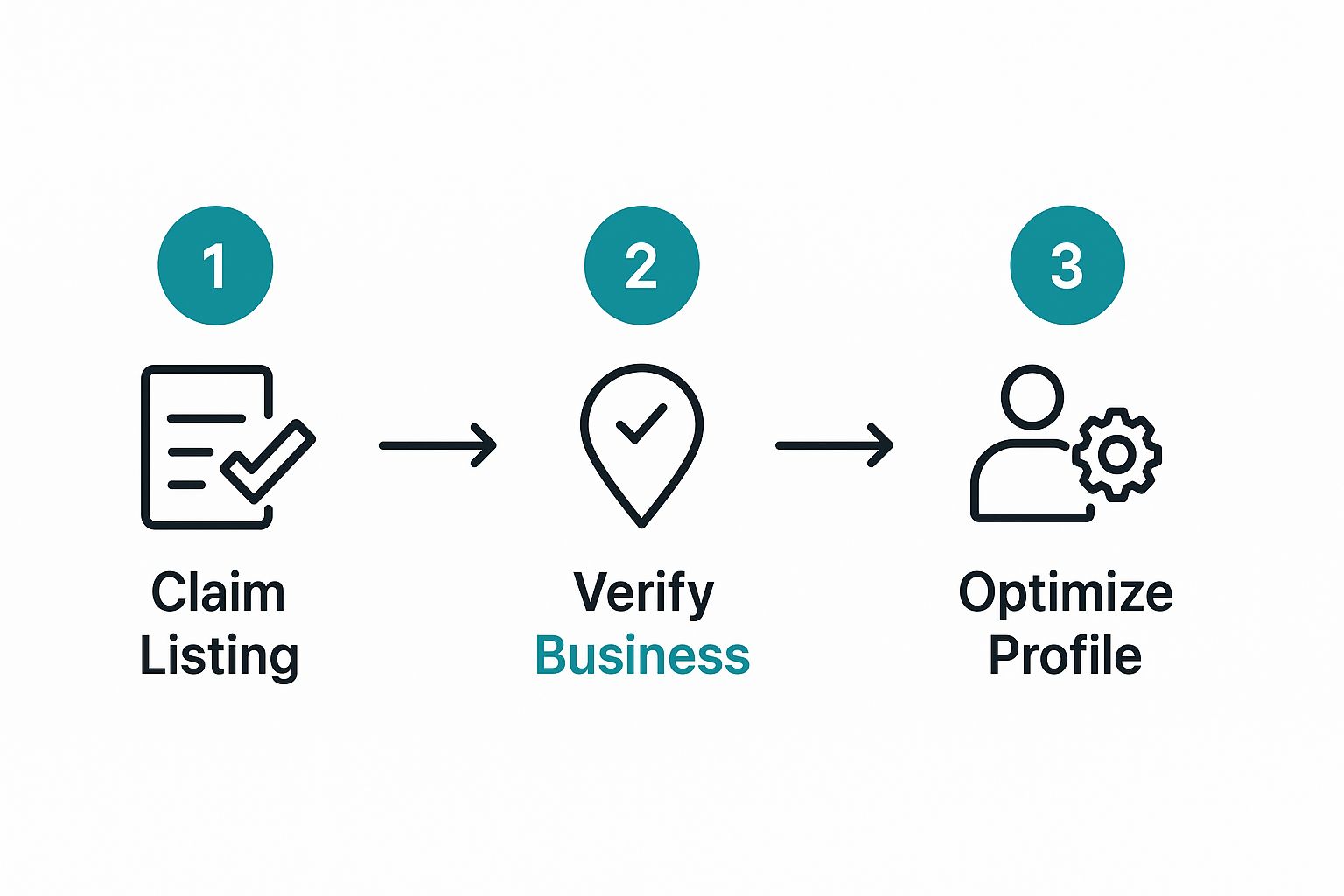
This visual really drives home the point: just claiming your profile is the starting line. The real wins come from the consistent optimization you do after you’re verified.
Core Optimization Pillars at a Glance
Let’s break down the fundamental elements that build a rock-solid GBP strategy. These pillars are what signal to both Google and your future customers that you’re a legitimate, trustworthy business worth their time and money.
| Optimization Pillar | Why It Matters | Actionable First Step |
|---|---|---|
| Complete Profile Information | An incomplete profile looks unprofessional and misses chances to give customers key info. | Go through every single field in your GBP dashboard today and fill it out completely. |
| Strategic Category Selection | Your primary category has a huge impact on who finds you. Specificity is key. | Review your current primary category. Is there a more specific option that better fits your core service? |
| Active Review Management | Reviews are a massive trust signal. Engagement shows you care. | Respond to your three most recent reviews (good or bad) with a personalized message. |
| Consistent Content Publishing | Google Posts keep your profile fresh and show Google that you’re an active business. | Create one Google Post right now about a current offer, event, or recent project. |
These aren’t just best practices; the data proves they work. For example, businesses that land in the top three local search results often have more than 200 reviews and are actively managing them. On top of that, a whopping 75% of these top-tier businesses have a fully fleshed-out business description.
Many local SEO pros will tell you that getting your primary business category right is arguably the single most important ranking factor. A practical example is a law firm: choosing “Personal Injury Attorney” is far more effective than the generic “Law Firm.”
A fully optimized Google Business Profile isn’t just about getting seen; it’s about building credibility before a customer ever clicks to your website or walks into your store. Every completed section, every new photo, and every thoughtful review response adds another layer to a powerful story of trust and professionalism.
At the end of the day, learning how to optimize your Google Business Profile means mastering these fundamentals. To truly build a dominant local search presence, you need to dig into the essential steps for dominating local maps SEO. When you start treating your profile like a living, breathing part of your marketing, you open a direct line to local customers who are actively looking for exactly what you offer.
Mastering Your Business Details and Categories
The data you put into your Google Business Profile is its lifeblood. This is where you go from just having a listing to actively telling Google—and your customers—who you are, what you do, and how to find you. Getting these details right is the bedrock of your local SEO strategy, directly influencing how you show up in searches and whether people trust what they see.
Accuracy isn’t just a nice-to-have; it’s a massive trust signal for Google. The search engine’s entire job is to provide users with reliable, consistent information. When your business details are identical across the web, it builds Google’s confidence in your profile, which can give your local search ranking a serious boost.
Nail Your NAP Consistency
If you’ve spent any time in local SEO, you’ve heard of NAP consistency. It’s a core concept for a reason. NAP stands for your business Name, Address, and Phone number, and these three details need to be exactly the same everywhere they appear online. This includes your GBP, your website, your Facebook page, and any other directory you can think of.
Imagine a friend giving you three slightly different addresses for a party. You’d be confused, and you might just give up and stay home. Google gets just as confused by inconsistent business information.
- Name: Always use your real-world business name. It’s tempting to stuff keywords in there like “Oakwood Landscaping – Best Lawn Care in Houston,” but don’t do it. Stick to just “Oakwood Landscaping.” Google sees keyword stuffing as spammy and can penalize your listing.
- Address: Pay close attention to the details. Is it “Street” or “St.”? “Suite 200” or “#200”? Pick one format and stick with it religiously across all platforms.
- Phone Number: Use a consistent local number that customers can actually reach you on. Avoid using different tracking numbers on different directories.
This Wikipedia entry on local search optimization digs into how search engines use this data to validate a business’s very existence and location.
The bottom line is that signals like NAP consistency are fundamental ranking factors. They are how search engines figure out if a local business is prominent, relevant, and trustworthy.
The Power of Choosing the Right Categories
Your business category is arguably the single most important field you’ll fill out. It’s your primary way of telling Google what your business is. Think about this: a staggering 84% of profile views come from “discovery” searches. That’s when someone searches for a category, product, or service—like “italian restaurant near me”—not your specific business name.
Picking the right category is how you get in front of all those high-intent customers.
Don’t settle for a general category when a more specific one exists. The more precise your category, the better Google can match you with qualified local customers who are actively looking for what you offer.
For example, a business that installs pools should choose “Swimming Pool Contractor” instead of the broader “Contractor.” That simple choice immediately filters out people searching for kitchen remodelers, putting your profile in front of a much more relevant audience.
Maximizing Your Category Strategy
Google lets you choose one primary category and several secondary ones. Your primary category has the most weight, so it needs to be the single best description of your core business.
- Primary Category Example: Imagine a coffee shop that also sells pastries. Its primary category should be “Coffee Shop,” not “Bakery,” because that’s its main identity.
- Secondary Categories: Now you can add the other things you do. That same coffee shop could add “Bakery,” “Cafe,” and “Espresso Bar” to capture those related searches.
Let’s apply this to a service business. A landscaping company’s primary category is likely “Landscaper.” But if they also trim trees and have a small retail garden center, their secondary categories could be “Lawn Care Service,” “Tree Service,” and “Garden Center.”
Handling Service Area Businesses
But what if you don’t have a storefront? If you’re a plumber, an electrician, or a mobile dog groomer, you go to your customers. This is where you need to define your business as a service-area business (SAB).
Instead of listing a physical address that customers can’t visit, you specify the cities, zip codes, or general regions you serve. This is a critical feature that hides your private address from the public while making sure you still show up in searches for customers within your service zone. For home-based and mobile businesses, this is the key to attracting local clients without sacrificing your privacy. Your NAP consistency is still vital, but Google will correctly show your service area on the map instead of a single pin.
Building Trust Through Reviews and Q&A
Alright, you’ve got the basics down—your business details are accurate, and your categories are dialed in. Now it’s time for the fun part: making your profile feel alive. This is where you shift from a static listing to a dynamic one that actually convinces people to walk through your door or give you a call.
The two best tools for this job? Customer reviews and the Questions & Answers (Q&A) section. Think of these as your direct line to what customers are thinking and a public stage to show off just how much you care about their experience. Get this right, and you’ll build a level of trust that both Google and potential customers find irresistible.
Cultivating and Managing Customer Reviews
Let’s be blunt: reviews are the most powerful form of social proof on your profile. A consistent flow of positive feedback is a massive signal to Google that you’re a legitimate, active business. More importantly, it shows real people that others have trusted you and had a great experience.
Getting more reviews often boils down to one simple action: just ask. So many happy customers are perfectly willing to leave feedback, they just get busy and forget. Your job is to make it incredibly easy for them.
- Email & SMS Requests: After a transaction, send a quick follow-up with a direct link to your Google review page. Something as simple as, “Hey [Customer Name], thanks for choosing us for your oil change today! If you have a moment, we’d love it if you could share your feedback on Google. It really helps us out! [Link]” works wonders.
- In-Person Prompts: For brick-and-mortar shops, a small sign at the counter or a QR code on the receipt is a gentle, effective nudge to remind people while their positive experience is still fresh in their minds.
Of course, collecting reviews is only half the battle. Knowing how to handle them is crucial, which is why managing customer reviews effectively is a skill every business owner needs to develop.
Responding to Every Single Review
How you respond to reviews is just as important—if not more so—than getting them in the first place. Quick, thoughtful replies show everyone that you’re engaged and that you genuinely value customer feedback. This goes for all of them: the good, the bad, and the neutral.
A calm, professional response to a negative review can be more valuable than a dozen five-star ratings. It shows every future customer who reads it that you’re accountable, which turns a potential negative into a huge signal of trust.
Let’s get practical with a couple of real-world examples:
- Positive Review Response: “Thanks so much for the kind words, Sarah! We’re thrilled you enjoyed the hazelnut latte. We look forward to seeing you again soon!” It’s specific, personal, and shows you’re paying attention.
- Negative Review Response: “Hi Mark, we’re very sorry to hear your order was delayed. That’s not the standard we aim for, and I appreciate you bringing it to our attention. Please give me a call directly at [Phone Number] so I can learn more and make this right.” This response is empathetic, takes ownership, and smartly moves the conversation offline.
This kind of hands-on engagement is a cornerstone of any smart Google Business Profile optimization strategy because it proves to both algorithms and people that you’re a business that truly cares.
Proactively Managing the Q&A Section
The Q&A section is probably the most overlooked feature on a Google Business Profile, and ignoring it is a huge mistake. Here’s why: anyone can ask a question, and more importantly, anyone can answer it. If you’re not on top of it, you risk having well-meaning but misinformed customers accidentally post incorrect information about your business.
The best defense is a good offense. Get in there first and seed the section yourself by posting and answering your own frequently asked questions.
Common Questions to Pre-Populate:
- Is there free parking available?
- Do you offer gluten-free options?
- Are you pet-friendly?
- What are your holiday hours?
- Do I need to make an appointment?
By answering these common queries yourself, you give customers instant, accurate info and cut down on repetitive phone calls for your team. It’s a simple move that removes friction and makes it easier for people to do business with you. Remember, the whole process of optimizing a Google My Business profile typically takes a professional between two to four weeks. The payoff, like a bump in traffic and leads, usually shows up within 30 to 90 days—and consistent engagement with reviews and Q&As is what keeps that momentum going long-term.
Driving Engagement with Posts, Products, and Services
Alright, you’ve got all your core business information locked in. Now comes the fun part, and frankly, the part where most businesses drop the ball. They set up their Google Business Profile, dust off their hands, and let it sit there collecting digital dust. That’s a massive missed opportunity.
Think of your profile as more than just a static listing; it’s an active marketing channel. It needs fresh content, just like your other social media accounts. The best tools in your arsenal for this are Google Posts, the Products feature, and the Services list. Using these consistently turns your profile from a simple business card into a dynamic mini-website right inside Google’s search results. More importantly, it sends a powerful signal to Google that you’re active and relevant, which is fantastic for your local rankings.

Turn Your Profile into a Content Hub with Google Posts
Google Posts are basically bite-sized updates that show up directly on your profile. They’re your chance to grab the attention of someone actively looking for what you offer. And this is critical—a huge 84% of profile views come from “discovery searches,” meaning people are searching for a category (like “plumber near me”) rather than your specific business name. Posts are what will make you stand out from the pack.
You have a few different types of posts to work with, each with a specific job:
- Updates: These are your go-to for general announcements. Did you just get a new piece of equipment? Share a photo of it in action. Finished a project you’re proud of? Show it off. Wrote a helpful new blog article? Link to it here.
- Offers: Nothing drives action like a good deal. Use this post type for special discounts, seasonal promotions, or a “first-time customer” special. You can even set start and end dates to create a little urgency.
- Events: If you’re hosting a workshop, webinar, or even an in-store demo, this is the perfect way to promote it. You can add the date, time, and a link for people to sign up.
Here’s a pro tip: The best Google Posts are timely, have a great photo, and include a crystal-clear call-to-action (CTA). Don’t just post—tell them what to do next. Think “Book Now,” “Learn More,” or “Call Today.”
A Practical Content Plan for a Local Business
You don’t need to post every day. Consistency is far more important than volume. Honestly, posting just once a week is enough to keep your profile looking fresh and signal to Google that you’re an active business.
Let’s map this out for a local auto shop. This is a simple, sustainable plan that anyone could follow.
| Week | Post Type | Content Idea | Call-to-Action |
|---|---|---|---|
| Week 1 | Offer | “Spring Special! Get 15% off all new tire sets this month only.” | “Call to Book” |
| Week 2 | Update | Photo of the team with new diagnostic gear. “We’ve invested in the latest tech to serve you better.” | “Learn More” |
| Week 3 | Update | Link to a new blog post: “5 Signs Your Brakes Need Checking.” | “Read Now” |
| Week 4 | Event | “Join our Free Tire Safety Check Clinic next Saturday from 10 AM to 2 PM.” | “Get Directions” |
See how that works? It’s a healthy mix of promotional and helpful content that appeals to people at different stages of their buying journey.
Build a Digital Menu with Products and Services
Beyond posts, the Products and Services sections are where you can build out a detailed catalog of everything you offer. This is a game-changer for local SEO because you’re adding tons of keyword-rich content directly to your profile. It helps you show up for those super-specific, long-tail searches.
If you’re a service business, like a plumber or an HVAC company, the Services tab is your new best friend. Don’t just list “Pipe Repair.” Get specific and descriptive.
- Service Name: Emergency Leak Repair
- Description: “24/7 rapid response for burst pipes and critical water leaks. Our expert technicians arrive quickly to minimize damage and provide a lasting solution. We serve the entire metro area.”
- Price: Starting from $150
For shops or e-commerce businesses, the Products feature is even more powerful. You can build a great-looking, shoppable storefront right on your Google profile. You get to add high-quality photos, detailed descriptions, prices, and—most importantly—a direct link to buy the item on your website.
Think about a local bookstore. Instead of a generic profile, they could create product categories like “New Fiction Arrivals,” “Local Authors,” and “Children’s Books.” Each product could be a specific book with its cover art, a short blurb, and a “Buy Now” button that takes the searcher right to their online store. It just makes it incredibly easy for someone to go from a search to a sale in a single click.
Bring Your Business Profile to Life with Photos, Videos, and Messaging
Having all your business information correct is the foundation, but let’s be honest—text is boring. Photos and videos are what stop the scroll and give people a real taste of what you’re all about. This is where you go beyond just telling them what you do and actually show them.
When Google sees you’re consistently adding fresh photos, it signals that you’re active and paying attention. Even more crucial, it tells potential customers that what they’re seeing is current, not some outdated picture from five years ago.
Build a Visual Portfolio That Tells Your Story
Think of your photo gallery as a virtual tour. You want to anticipate what a customer would want to see before they decide to visit or call. A great visual portfolio doesn’t just happen by accident; you have to be intentional about it.
Here’s a practical checklist of must-have photos for a local restaurant:
- Your Storefront: A clean, well-lit shot during the day that clearly shows your sign and entrance. Make sure the street number is visible.
- The Inside Vibe: Capture the atmosphere. Show off the dining room, the bar area, and any unique decor.
- Your Team in Action: Pictures of your chefs in the kitchen or servers interacting with happy customers add a much-needed human touch.
- The Food: Don’t just list your menu; show it off. High-quality photos of your most popular dishes are non-negotiable.
Here’s a pro tip I share with all my clients: rename your image files before you upload them. Instead of a generic name like “IMG_8542.jpg,” change it to something descriptive like “pepperoni-pizza-downtown-chicago.jpg.” It’s a small, easy step that adds another layer of keyword relevance. For more hands-on advice, check out our complete guide to Google Business Profile optimization.
Why Video is a Game-Changer
Video takes everything a photo does and kicks it up a notch. In 30 seconds, a short video can communicate more about your business’s personality and expertise than a dozen static photos ever could. And you don’t need a Hollywood budget to make an impact.
Adding a few high-quality videos can really set you apart. If you’re new to the game, getting some practical advice on video production for small businesses can make your content look sharp and professional.
A simple video tour or a heartfelt customer testimonial can be the final nudge that turns a curious searcher into a paying customer. It creates an emotional connection that text and photos often struggle to build on their own.
Not sure where to start? Try one of these simple ideas:
- A Quick Tour: A 30- to 60-second walkthrough of your shop or office.
- Customer Testimonial: A short, authentic clip of a happy client sharing their experience.
- A Quick Tip: A plumber could film a 1-minute video on how to prevent pipes from freezing in winter. Simple, helpful, and establishes authority.
Turn on Messaging and Talk Directly to Customers
Beyond visuals, one of the most powerful conversion tools Google offers is the Messaging feature. It literally adds a button to your profile that lets customers send you a text message. This is your chance to open a direct, immediate line of communication.
Flipping this feature on signals that you’re accessible and eager to help. But be warned: your response time matters. Google actually shows customers how quickly you typically reply, so a prompt response is non-negotiable for making a good impression.
A great first step is setting up an automated welcome message to manage expectations. Something like: “Thanks for contacting Oakwood Dental! We’ll reply to your message within one hour during business hours.”
This kind of direct engagement is a massive driver of conversions. The data is clear: fully optimized GBP profiles see a conversion rate of 4.5%, which is more than double the 1.8% rate of half-finished listings. It’s also been shown that businesses in competitive cities update their profiles 2.5 times more often, proving that active management—including responding to messages—is what separates the winners from the losers. You can discover more insights about these GMB statistics and see just how much the ongoing effort pays off.
Common Questions About Google Business Profile
Even with a solid plan, a few questions always seem to surface when you’re getting deep into optimizing your Google Business Profile. Let’s walk through some of the most frequent ones I hear from business owners, so you can get clear, practical answers and keep moving forward.
How Long Until I See Results?
This is the big one, isn’t it? Everyone wants to know when the magic happens. While simple updates like changing your business hours will show up almost immediately, the real impact—the stuff that affects your bottom line—takes a little patience.
Generally, you can expect to see a meaningful shift in things like calls, website visits, and your ranking for important keywords within 30 to 90 days. This isn’t a hard-and-fast rule, though. Your results will depend heavily on factors like how competitive your industry is and the specific market you’re in. The trick is to stop thinking of your profile as a one-and-done task and start treating it as an active part of your marketing.
The businesses that win in local search are the ones who show up consistently. Regular posts, a steady flow of new photos, and quick responses to reviews are what build the momentum you need for real, long-term growth.
What Is the Most Important Optimization Task?
If you’re strapped for time and can only do one thing, make it your primary business category. I can’t stress this enough. It’s hands-down the single biggest ranking factor because it tells Google, in no uncertain terms, exactly what your business is. Getting this right is your best bet for showing up when people are searching for services like yours but don’t know your business name yet.
Once you’ve locked that in, your next priorities should be:
- Filling out every single field in your profile. A 100% complete profile looks professional and gives Google (and your customers) all the information they need. Don’t leave anything blank.
- Actively managing your reviews. This means responding to all of them, good and bad. It shows you’re paying attention and builds incredible trust with anyone considering your business.
Does My Home Address Have to Be Public?
Not at all. This is a huge point of concern for anyone running a business from home or who travels to their clients, and thankfully, Google has the perfect solution: designating yourself as a service-area business (SAB).
During setup, you can tell Google that you serve customers at their locations. Instead of a pin on a map at your home, you’ll define your service area by listing the cities, zip codes, or counties you cover. Google then hides your physical street address, protecting your privacy while making sure you still show up in local searches for the areas you actually serve. It’s an essential feature for plumbers, mobile dog groomers, consultants, and countless other professionals who don’t have a traditional storefront.
Optimizing your Google Business Profile is one of the highest-impact things you can do to bring in more local customers. If you’re ready to transform your profile into a genuine growth engine, Galant Studios has the expertise to get it done. We build local SEO strategies that put you in front of the right people at the moment they’re ready to buy. Find out how we can boost your online presence by visiting us at https://galantstudios.com.