
What is SEO website architecture? It's the strategic blueprint for your digital presence—how you organize, structure, and link every page on your website. Think of it as the master plan that helps both potential customers and search engines navigate your site, understand its purpose, and find exactly what they need. Get this foundation right, and you're not just improving SEO; you're building a powerful engine for conversions.
Is Your Website a Skyscraper Without a Blueprint?

Imagine trying to build a skyscraper without an architectural plan. The foundation would be weak, hallways would lead to dead ends, and anyone who entered would get hopelessly lost. This is precisely what happens online when a business neglects its SEO website architecture.
Without a solid structure, your website becomes a confusing maze, not an inviting storefront. This guide will show you how to stop treating site architecture as a dry, technical task and start seeing it for what it truly is: the essential blueprint for your online success.
The Foundation of Digital Success
A well-planned structure is the bedrock of any serious SEO strategy. It directly impacts how easily search engines like Google can find, crawl, and index your content—the first step to even appearing in search results. More importantly, it guides your customers on a frictionless path from discovery to purchase.
A logical site plan delivers on several critical business goals:
- Improves Search Engine Crawlability: A clean hierarchy allows search engine bots to move through your site efficiently, ensuring they discover every valuable page you’ve created.
- Enhances User Experience (UX): When navigation is intuitive, visitors effortlessly find the information they need, keeping them engaged and on your site longer.
- Boosts Conversion Rates: A clear path to purchase is a profitable one. When users can locate products or services without friction, sales naturally increase.
- Builds Topical Authority: Grouping content into strategic clusters sends a powerful signal to Google that you have deep expertise, helping you dominate your niche.
A website's architecture influences how users navigate your site. Good site architecture keeps information organized and easy to find, meaning site visitors don’t have to do much searching or clicking to get from point A to point B.
From Technical Task to Business Strategy
It's time to shift your mindset. Site structure isn't a job for the IT department; it's a core business strategy. A messy site doesn't just frustrate potential customers; it makes it nearly impossible for search engines to recognize your authority. This means your best content gets buried, invisible to both people and search crawlers.
According to the U.S. Small Business Administration, a well-designed website is a critical tool for growth, acting as your 24/7 storefront. A strong architecture is what holds that storefront together.
Throughout this guide, we'll break down exactly how a logical framework impacts user engagement, conversions, and long-term growth. You'll gain actionable insights to build a digital blueprint that serves both your audience and your bottom line.
Why SEO Website Architecture Is Your Competitive Edge
A high-performing website is built on more than just stunning visuals and clever copy. Beneath the surface, it must be a highly organized system engineered for discovery and conversion. That system is your SEO website architecture—a clear, logical framework that guides both users and search engines through your content.
Ignoring it is like building a massive library and scattering all the books randomly on the floor. Even if you have the best information in the world, it’s worthless if no one can find it. This structure isn’t just a background detail; it’s a fundamental asset that translates directly into better rankings, higher engagement, and a stronger bottom line.
Make It Effortless for Search Engines to Crawl
Before your website can rank, search engines like Google must discover and understand its pages. They use automated programs called "crawlers" or "spiders" that follow links to map out your site. A logical architecture creates a clean, interconnected network of pathways for these crawlers.
This ensures every valuable page—from your homepage down to the most specific blog post—is found and indexed efficiently. Without these clear pathways, important pages can become "orphan pages," isolated and invisible to search engines. A well-planned structure gives all your content a fighting chance to be seen.
Create a Seamless Experience for Your Visitors
Have you ever landed on a website and felt completely lost? A clear, intuitive navigation path is the heart of a positive user experience (UX). When visitors can easily find what they’re looking for, they are far more likely to stay, explore, and convert into customers.
Good SEO website architecture achieves this by organizing content into predictable categories and subcategories. This simple logic prevents the kind of user frustration that sends people clicking the "back" button in search of a competitor.
- Lower Bounce Rates: Users who see a clear path to their goal are less likely to abandon your site.
- Longer Visit Durations: An easy-to-navigate site encourages exploration, leading visitors to discover more of your content and spend more time with your brand.
- Higher Conversion Rates: A smooth journey from discovery to action—whether buying a product or filling out a form—drives better business results.
Build Unshakable Topical Authority
Beyond just helping search engines find your pages, a strong architecture helps them understand what your site is about. When you group related content into thematic clusters, you signal deep expertise. Imagine a main "pillar" page covering a broad topic (e.g., "Small Business Accounting"), which then links out to several supporting pages that dive into specific subtopics (e.g., "Choosing Accounting Software," "Understanding Cash Flow").
This clustering model proves to search engines that you are a genuine authority. When Google recognizes your site as a comprehensive resource, it's far more likely to reward your pages with higher rankings for relevant searches.
To see how these elements drive tangible results, let's break down the core pillars and their direct business impact.
The Pillars of Website Architecture and Their Business Impact
| Architectural Pillar | What It Means for Your Site | The Actionable Business Benefit |
|---|---|---|
| Site Hierarchy | A logical, tree-like structure of categories and subcategories that organizes your content. | Makes navigation intuitive, leading to lower bounce rates, higher user engagement, and more conversions. |
| Internal Linking | Strategically connecting pages within your site to create clear pathways for users and crawlers. | Distributes page authority ("link equity"), boosts rankings for key pages, and keeps users on your site longer. |
| URL Structure | Clean, descriptive web addresses that reflect the page's content and its place in the hierarchy. | Improves click-through rates from search results and helps search engines instantly understand page context. |
| Crawlability & Indexability | Ensuring search engine crawlers can easily access and understand your content without hitting roadblocks. | Guarantees your valuable content can actually appear in search results, maximizing your organic traffic potential. |
Ultimately, each pillar works in concert to create a website that performs better for both search engines and the people who use it.
Poor architecture is a silent killer of organic traffic. A weak internal linking strategy that fails to guide search engines is a primary reason why a staggering number of web pages get zero traffic from Google. To gain a true competitive edge, this structure must be part of your broader search engine optimisation strategies. In a world where organic search drives the majority of website traffic, a logical hierarchy isn't just a best practice—it's essential for survival.
The Core Principles of a High-Performing Site Structure
Now that you understand the "why," let's dig into the "how." Building a solid SEO website architecture comes down to a few core principles. Think of these as foundational rules that shape how both people and search engines experience your site. Getting them right is the key to creating a structure that’s logical, scalable, and built to convert.
At the heart of this is your site's hierarchy. Let's use an analogy. Imagine a department store where every product category is clearly visible on one massive floor. Now, picture another store with products spread across ten confusing floors, forcing you to navigate random escalators to find what you need. The first is a flat architecture; the second is a deep architecture.
For SEO and user experience, a flatter structure wins almost every time.
Adopt a Flat Hierarchy
A flat site architecture is about making your most important content incredibly easy to access. The golden rule is to keep the click depth—the number of clicks it takes to get from your homepage to any other page—to three or fewer. It’s a simple concept with a massive impact.
When your key service or product pages are buried deep within your site, they receive less attention from search engines. Worse, real users struggle to find them. This friction leads to abandoned carts and lost leads.
Actionable Example: An e-commerce site selling shoes should have a path like Home > Men's > Running Shoes, which is just two clicks. A deep structure might look like Home > Footwear > Men's Department > Athletic > Running, which is four clicks and buries the most valuable pages. Keeping important pages close to the homepage signals their importance and makes the user journey effortless.
This diagram brings home how a clean structure benefits your site from every angle.
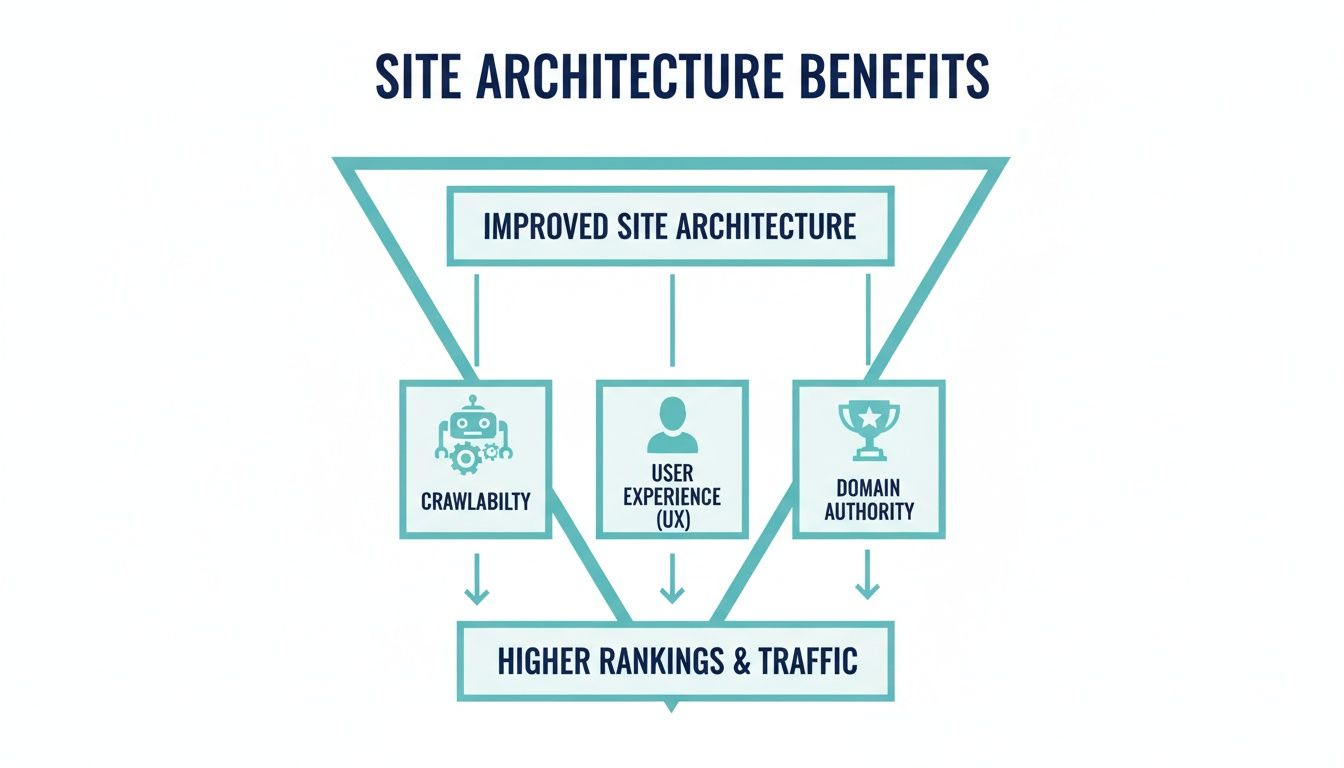
As you can see, making your site easier for crawlers and users to navigate builds the authority that drives rankings and revenue.
Design Logical URL Structures
Your URLs are more than just web addresses; they’re signposts. A clean, logical URL structure shows users and search engines what a page is about at a glance, reinforcing your site's hierarchy.
Actionable Example: A local plumbing company offers emergency repairs.
- Poor URL:
yoursite.com/services/p-id=592(Tells you nothing.) - Good URL:
yoursite.com/services/emergency-plumbing-repair(Instantly clear and keyword-rich.)
Here are a few practical rules to follow:
- Make them readable: Use real words that describe the page’s content, not a jumble of codes.
- Include keywords: Naturally incorporate the page's primary keyword to signal its topic.
- Use hyphens: Always separate words with hyphens (-). Search engines read them as spaces.
For a deeper dive, check out this guide on how to create SEO-friendly URLs.
Master Internal Linking With Topic Clusters
Internal links are the threads that weave your website into a cohesive whole. When done right, they build a powerful network that establishes your topical authority. The most effective way to achieve this is by creating topic clusters.
Here’s how the model works:
- Pillar Page: A comprehensive hub covering a broad topic (e.g., "The Ultimate Guide to Digital Marketing").
- Cluster Content: A series of specific articles exploring subtopics related to the pillar (e.g., "Getting Started with Email Marketing," "A Beginner's Guide to SEO").
- Internal Links: All cluster articles link back up to the main pillar page, and the pillar page links out to each of them.
This structure proves to Google that you have deep expertise on a subject. For an e-commerce store, a pillar page might be "Women's Hiking Boots," with cluster pages for "Waterproof Hiking Boots" and "Lightweight Hiking Boots."
Implement Clear Navigation and Breadcrumbs
Finally, your visible navigation should be a direct reflection of your site’s architecture. Your main menu must present your primary categories clearly, guiding people where they want to go without any guesswork.
One of the most valuable—and often overlooked—navigation elements is breadcrumbs. These are the secondary navigation links, usually near the top of a page, that show a user's path through your site.
For example: Home > Services > Emergency Plumbing Repair
Breadcrumbs serve two critical functions:
- They improve user experience: They let people easily backtrack to a higher-level category.
- They boost SEO: They give search engines another clear signal about your site's hierarchy, reinforcing your structure.
By sticking to these principles—a flat hierarchy, logical URLs, strategic internal linking, and clear navigation—you create a website truly built for discovery, engagement, and authority.
The Technical Nuts and Bolts You Can't Afford to Ignore
While a logical hierarchy and clean URLs create the blueprint, several technical pieces are required to build the house. These elements are your official instructions to search engines, ensuring they navigate your site exactly as you intended. Getting these right is non-negotiable for a structurally sound website.
Think of your XML sitemap as the official, detailed map you hand-deliver to Google. Instead of hoping crawlers find all your pages by following links, the sitemap provides a complete list of every important URL you want them to index. This proactive step ensures no valuable content gets missed, which is especially crucial for new pages or those buried deep within your site.
In contrast, your robots.txt file acts like a bouncer at a club. It’s a plain text file that tells search engine bots which parts of your website are off-limits. This is vital for blocking low-value pages—like internal search results, admin logins, or thank-you pages—from being crawled. By doing so, you guide search engines to spend their limited "crawl budget" on the pages that actually drive business.
Taming Duplicate Content with Canonical Tags
One of the biggest technical headaches, especially for e-commerce, is duplicate content. A single product might exist at several different URLs due to filters (like color or size) or being listed in multiple categories. This confuses search engines, forcing them to guess which version is the "real" one and splitting your ranking power.
The canonical tag is your solution. It’s a snippet of code that points search engines to the one true master version of a page.
By designating a "canonical" URL, you consolidate all the SEO value—like backlinks and engagement signals—from the duplicates into one authoritative page. This clears up confusion and concentrates your ranking power where it belongs.
Actionable Example: An online shop sells a red dress available in two categories.
yoursite.com/dresses/red-midi-dressyoursite.com/new-arrivals/red-midi-dress
Both URLs show the same item. By placing a canonical tag on the "new-arrivals" page that points to the "dresses" URL, you tell Google, "Hey, the first URL is the one you should index and rank."
Adding Context with Structured Data
It’s not enough for search engines to find your pages; you need them to understand what the content is about. This is what structured data (often using Schema.org) does. It’s a standardized code format that adds descriptive labels to your content, making it incredibly easy for search engines to comprehend.
The need for this clarity has only grown with the rise of AI in search. Yet, many sites still lag behind. Implementing structured data isn't just a good idea—it's essential for standing out.
By using structured data, you can explicitly tell Google that a page contains:
- A Product, along with its price, availability, and reviews.
- A Recipe, complete with ingredients and cooking time.
- A Local Business, with its address, phone number, and hours.
This context helps your site earn "rich snippets" in search results—those visually appealing listings with star ratings, prices, or event details. These enhancements make your listings stand out, improve visibility, and can dramatically increase your click-through rates.
Properly managing these technical signals is a core part of website performance optimization techniques. To streamline the process, powerful tools like SEO plugins like Yoast can be a huge help, making it much simpler to implement sitemaps, canonical tags, and structured data.
How to Plan and Implement Your Site Architecture
Putting theory into practice is where the real work begins. Building a solid SEO website architecture is a methodical process that bridges your business objectives with your users' needs. When you follow a structured plan, you create a logical and scalable foundation that will support your online presence for years to come.

Think of it like designing the layout of a physical store. You wouldn't just start building aisles without first understanding what you sell and who your customers are. The goal is to make the journey from the front door to the checkout counter as smooth and intuitive as possible.
Start with Goals and User Intent
Before you map out a single page, define what success looks like. Your site’s structure must directly support your primary business goals. Is your main objective to generate leads? Sell products? Educate your audience?
At the same time, put yourself in your customers' shoes. What problems are they trying to solve when they land on your site? Understanding user intent is crucial for organizing your content in a way that feels helpful and intuitive to them.
Actionable Example: For an online home goods store, the primary goal is selling furniture. A common user intent is finding a "modern solid wood coffee table." Your architecture's job is to create a dead-simple path from that need to the product page.
Map Keywords to Your Structure
Once your goals are clear, keyword research becomes your blueprint. This is about more than just finding standalone keywords; it’s about mapping them to the specific pages that will form your site’s hierarchy. This ensures every page has a clear purpose and is optimized to attract the right audience.
Think in terms of topics and subtopics:
- Identify Broad Topics: These become your main categories or "pillar" pages (e.g., "Living Room Furniture," "Bedroom Furniture").
- Find Specific Subtopics: These flesh out your subcategory pages (e.g., "Sofas," "Coffee Tables," "Bed Frames").
- Target Long-Tail Keywords: These are perfect for highly specific product pages or blog posts (e.g., "small apartment sectional sofa," "round oak dining table for 6").
Mapping keywords this way ensures your site is built on a foundation of real search demand.
Create a Visual Sitemap
Now it’s time to bring the plan to life. A sitemap is a hierarchical diagram of your website, showing how all the pages relate to one another. You don’t need fancy software; a simple spreadsheet or a mind-mapping tool like Miro or Whimsical will work perfectly.
Your visual sitemap is the definitive blueprint for development. It clarifies the hierarchy, prevents orphan pages, and ensures every piece of content has a logical home before a single line of code is written.
Start with your homepage at the top. From there, branch out to your main categories, then list the subcategories and important pages underneath each one. For our home goods store, a basic sitemap might look like this:
- Homepage
- Living Room
- Sofas
- Coffee Tables
- TV Stands
- Bedroom
- Beds
- Dressers
- Nightstands
- About Us
- Contact
- Living Room
This simple visualization makes it easy to spot potential problems, like a category becoming too crowded or an important page being buried too deep.
Design URL and Navigation Flow
With your sitemap finalized, designing your URL structure is the next logical step. Each URL should perfectly mirror the hierarchy you just created, keeping them clean and descriptive.
Following our example, a logical URL for coffee tables would be: yourstore.com/living-room/coffee-tables. This structure immediately reinforces the page’s context.
Finally, your main navigation menu should reflect the top levels of your sitemap, giving users a predictable path to follow. There are several types of sitemaps, a topic covered in detail by government web management resources, which you can explore through a search on USA.gov. By carefully aligning your goals, research, and visual plan, you can build a powerful SEO website architecture that’s set up for long-term success.
Auditing Your Current Site Architecture with a Practical Checklist
Before you can build a better site architecture, you need a clear picture of what you’re working with. Running a quick audit can uncover the hidden cracks in your website's foundation that might be holding back your SEO performance.
Think of this as a structural inspection for your website. You don’t need to be a coding expert to spot the foundational issues that impact how easily users—and search engines—can find what they need. This checklist will help you identify the most common red flags.
Your Five-Point Architecture Audit
This audit zeroes in on five critical areas that together give you a solid understanding of your site’s structural health. Go through each point and identify your opportunities for improvement.
-
Check Key Page Click Depth: Start at your homepage. How many clicks does it take to reach your most important product or service pages? If it's more than three, those pages are buried too deep, making them harder for users to find and signaling to search engines that they are less important.
-
Analyze URL Consistency: Look at the URLs across your site. Are they clean, logical, and predictable, like
yoursite.com/services/specific-service? Messy URLs filled with random parameters don't just look untrustworthy; they also make it harder for search engines to understand your site's hierarchy. -
Identify Potential Orphan Pages: An orphan page has no internal links pointing to it, making it invisible to search engine crawlers. Use a crawling tool to hunt for pages that aren't connected to your main navigation or linked from any other content.
Every page on your site should have a logical path leading to it. An orphan page is like a room with no doors—valuable content gets locked away where no one, including Google, can find it.
-
Review Main Navigation Flow: Does your primary menu make sense at a glance? A new visitor should be able to instantly grasp what your business offers just by looking at the navigation. If it’s cluttered, confusing, or disorganized, you're creating a roadblock that frustrates users and hurts engagement.
-
Verify Your XML Sitemap and Robots.txt: Your XML sitemap is your roadmap for Google. Make sure it's up-to-date and submitted without errors in Google Search Console. Just as important is your
robots.txtfile. A simple mistake here can accidentally block search engines from crawling crucial sections of your site. Understanding the fundamentals of robots.txt best practices is non-negotiable for effective crawl management.
Answering Your Site Architecture Questions
Getting your head around SEO website architecture isn't a one-and-done task. Your site is a living thing, and as your business evolves, so will the questions you have about keeping it in top shape. Here are answers to the most common questions we hear from business owners.
How Often Should I Revisit My Website Architecture?
Think of your site architecture like a business plan: it needs a full review at least annually. It's also wise to re-evaluate anytime your business undergoes a major change, like adding a new service line or targeting a new audience. This ensures your website's foundation always supports your business goals.
That said, smaller tweaks shouldn't wait. Optimizing internal links or adding new blog posts to your content clusters should be part of your routine SEO work.
Can I Fix My Site Architecture Without a Full Redesign?
Yes, absolutely. Many people believe they need a massive, expensive redesign to fix structural problems, but that's rarely true. You can make incredibly powerful improvements piece by piece.
Don't let the thought of a complete overhaul paralyze you. Small, focused changes can deliver a serious boost to your SEO performance without the headache of a massive project.
Here are a few high-impact changes you can make right away:
- Strengthen your internal linking to guide users and search engines between related pages.
- Clean up messy URLs and implement 301 redirects for any pages you move.
- Build out topic clusters around your best-performing content to signal your expertise.
- Ensure your XML sitemap is up-to-date and accurately reflects all important pages.
What Is the Difference Between Site Architecture and Navigation?
This is a great question. Think of it with this analogy: your site architecture is the complete architectural blueprint for a house. It shows how every room connects, the load-bearing walls, the plumbing, and the wiring—the entire underlying structure.
Your website navigation, on the other hand, is like the signs and doorways you actually use to walk through that house. It's the main menu, footer links, and breadcrumbs that visitors see and interact with. Your navigation is the visible, user-facing part of your architecture, but it doesn't show the whole picture. For a deeper dive, you can explore the principles of information architecture on Wikipedia.
At Galant Studios, we believe a powerful SEO foundation isn't an afterthought—it's built-in from the start. If you're ready to create a high-performing site structure that fuels traffic and growth, explore our expert web design and development services.