

Introduction to Design
- Good design makes a powerful impact by solving problems visually with art, colors, typography, and images, creating an immediate sense of aesthetic appeal and usability.
- The importance of design lies in its ability to create solutions that improve user experience and meet long-term business goals, as seen in great examples of product design.
- Designers aim to create visually appealing and functional designs that enhance brand recognition and customer engagement, such as through consistent branding and minimalist design.
- Understanding good and bad design is essential for creating positive user experience and usability, as highlighted in examples of good and bad designs.
Principles of Good Design
- Dieter Rams’ 10 Principles for Good Design emphasize inclusivity, sustainability, and intuitive navigation, providing a foundation for good design.
- Good design follows principles that emphasize both aesthetics and functionality, creating a great example of how design can improve usability.
- Clever design can make experiences invisible and intuitive for users, as seen in well-designed mobile apps and web pages.
- The key difference between good and bad design lies in its ability to create a seamless and engaging user experience, as demonstrated in examples of good design.
Examples of Good Design
- Apple’s minimalist website design and Mailchimp’s playful rebrand are great examples of effective visual communication and consistent branding.
- The geodesic dome is a great example of how design can create functional and sustainable solutions, reducing plastic waste and promoting environmental sustainability.
- Parking signs in Los Angeles are an example of bad design, while Nikki Sylianteng’s parking sign design is a great example of user-centered design, creating an immediate sense of clarity and usability.
- Car designs like Porsche and Saarinen armchairs exemplify great design that combines practicality and aesthetic beauty, making life easier for users.
Best Practice in Design
The use of color, typography, and images can create a visually appealing design that enhances brand recognition and customer engagement, as seen in great examples of graphic design.
Best practice in design involves understanding user needs and creating solutions that meet those needs, as seen in examples of good design.
Designers should prioritize usability, accessibility, and aesthetic appeal in their designs, creating a great example of how design can improve user experience.
Simple design and intuitive navigation are essential for creating a seamless user experience, as demonstrated in well-designed mobile operating systems.
Analyzing examples of bad designs compared to good ones isn’t just entertaining—it’s also highly educational for designers. These comparisons highlight pitfalls to avoid and help us understand how to translate design theories into real-world solutions. As Jared Spool, an American writer, researcher, and usability expert, once said: “Good designs, when done properly, become invisible. Only when they’re done poorly are they noticeable.” Let’s look at 5 examples of clearly poor designs, highlight how good designs work, and extract some lessons to help us create great, invisible experiences for our users.
The Impact of Good and Bad Design
- Good design can create a positive impact on users, enhancing their experience and engagement with a product or service, as seen in examples of good design.
- Bad design can have a negative impact, leading to frustration and confusion, as demonstrated in examples of bad design.
- The impact of design on business goals and customer satisfaction cannot be overstated, making it an essential part of any business strategy, as highlighted in articles on design.
- Understanding the difference between good and bad design is crucial for creating effective design solutions that meet user needs and business goals, as seen in examples of good and bad designs.
Design Inspiration and Education
- Design inspiration can come from various sources, including nature, art, and technology, creating a sense of wonder and curiosity.
- Education and training are essential for designers to develop their skills and stay up-to-date with the latest design trends and technologies, as seen in examples of good design.
- The New York School of design and the work of Steve Jobs are great examples of how design can inspire creativity and innovation, creating a sense of excitement and possibility.
- Designers should continually seek out new ideas and inspiration to stay ahead of the curve and create innovative design solutions, as demonstrated in great examples of design.
1. Information Overload
BAD: LOS ANGELES PARKING SIGNS
Los Angeles parking signs have epitomized information overload for decades. They’ve always been notoriously difficult to understand because traffic rules are complex, which led to the need to compress a lot of information into very small spaces. How confusing are these signs? Let’s look at this example from the 2010s:
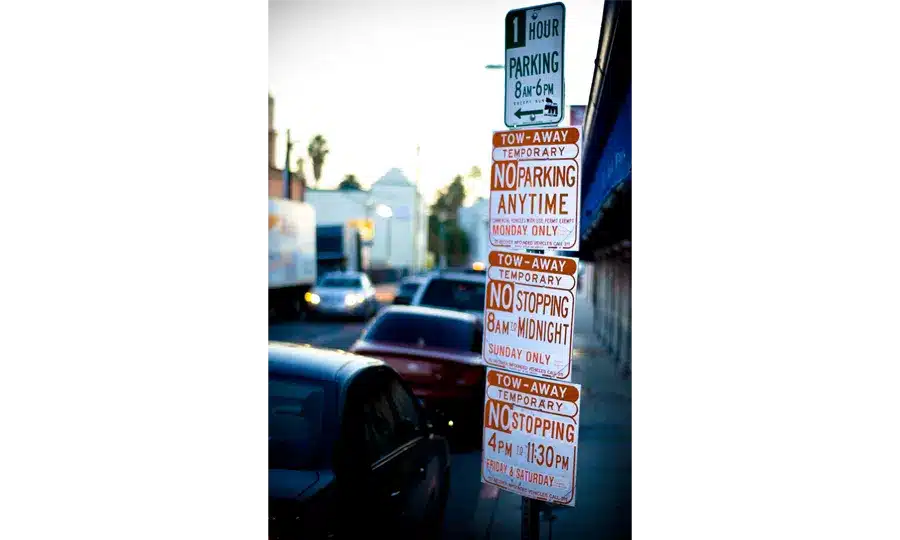
Even as parking signs go, this example is relatively simple.
Imagine you’re a driver on this road on Monday morning at 9 AM. Can you park here? What sounds like a simple question requires significant mental effort to answer.
As designers, we frequently face situations where we need to present a lot of information in a small space. LA parking signs might be an extreme case, but often mobile app designs face the same issues. Is there a solution—for both parking signs and designers?
GOOD: NIKKI SYLIANTENG’S PARKING SIGN
Designing a sign that displays all the information while being easy to understand sounds impossible. But that’s exactly what Brooklyn designer Nikki Sylianteng did.
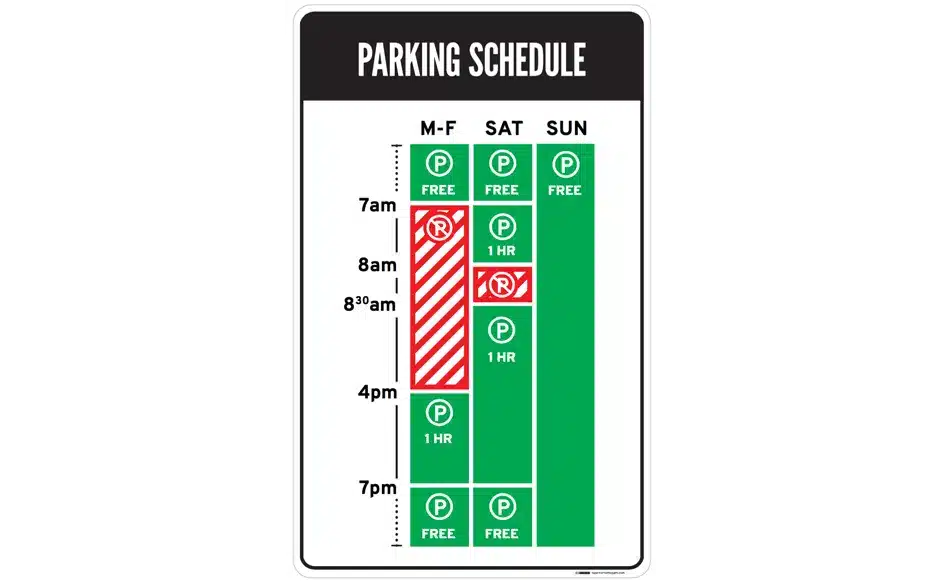
Nikki proposed her parking sign for use in LA as part of an experiment. Part of what makes Nikki’s design work well is that it’s user-centered: she simply realized that drivers just want to know if they can park in a spot or not. Yes or no—that’s all drivers consider necessary, and that’s all parking signs should show.
In her design, she also used visuals rather than text to convey information. The result is incredibly intuitive: green for OK, red for “No Parking.” It’s even designed for colorblind users, with stripes for “No Parking.”
Now, when you look at the sign, you’ll know that on Tuesday at 9:00, parking is not allowed. The bars will tell you everything you need to know at a glance—simple.
LESSONS LEARNED: BEST PRACTICES
- Understand what users need, as design should be based on this. This helps reduce information overload.
- Have a lot of information to convey to your users? Try using images instead of text. Learn more about data visualization here.
2. Mystery Meat Navigation
BAD: LAZOROFFICE.COM
Coined in 1998 by Vincent Flanders through websites like Suck2, Mystery Meat Navigation (MMN) refers to cases where a link’s destination isn’t visible until the user clicks on it or hovers over it. The term MMN was a reference to the meat served in American public school cafeterias, which is processed so that the exact type is no longer visible.
MMN is bad because it reduces the discoverability of navigation elements. It adds cognitive effort for users, as they now have to guess or assume how to navigate.
While most MMN is found on older sites, it’s surprisingly common even on modern websites. Take Lazor Office, a design firm that creates pre-fabricated houses, for example.
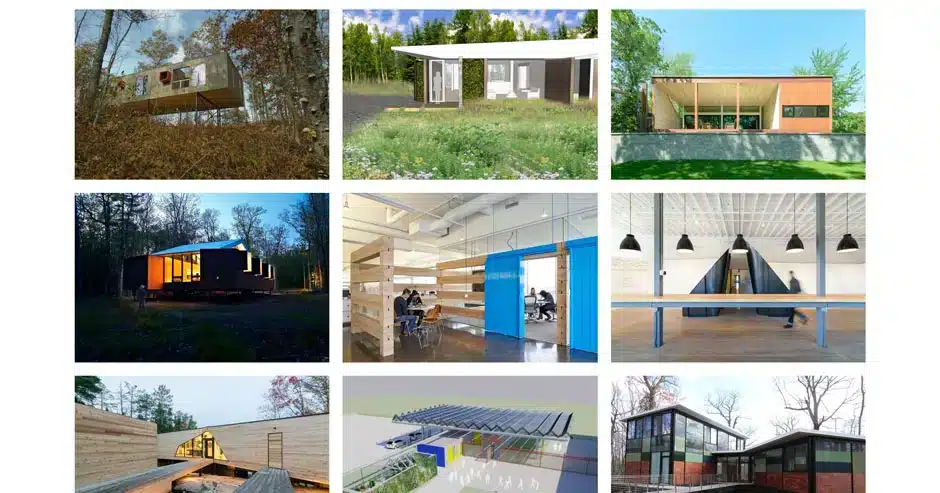
LazorOffice.com has an MMN image grid on the home page. As you can see, this layout gives few valuable clues about where to go. Instead, the nine images just sit there, leaving us to solve a puzzle rather than interact with the page.
Further down the home page is a grid of thumbnail images. Can you click on them? Well, yes—if you move your cursor over an image, it will change to a pointer. But what happens when you click on an image?
“Click to find out!” is not a good solution for user experience (UX). Chances are users will abandon navigation to find an alternative solution on a competitor’s site.
GOOD: COURSE CARDS ON THE INTERACTION DESIGN FOUNDATION SITE
Fortunately, MMN problems are easy to solve. The key is being aware that you need to clearly highlight links. Simply adding “View project” that appears on mouseover would improve the usability of the Lazor Office page.

The Interaction Design Foundation’s course cards are as unmysterious as links can get.
For the Interaction Design Foundation’s course cards, we not only have “View course” at the bottom of each card to indicate the action that will take place, but we also have a status on mouseover with the text “Go to course.” Many sites follow a similar convention, and you should too to maximize your site’s usability.
LESSON LEARNED: BEST PRACTICES
- Always label your links! You wouldn’t want to eat mystery meat—and similarly, users shouldn’t be forced to click on mystery links.
3. Delaying User Actions
BAD: IFLY50.COM
As designers, we should add delays to user actions with extreme caution, unless the purpose of that action is to discourage users. Sometimes, however, we might unintentionally add delays to user actions (especially for aesthetic or novelty reasons), which are detrimental to UX design.
An example is iFly50.com, created for the anniversary of KLM’s iFly magazine. iFly is a vertical scrolling site featuring 50 travel destinations, and in some destinations (like the one below), a button at the bottom asks users to click and hold for a few seconds to view more photos.
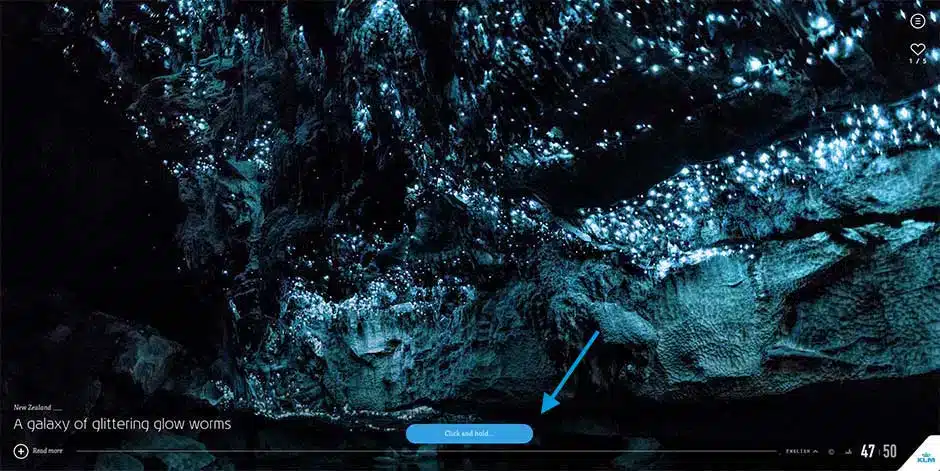
iFly50 expects users to click and hold for several seconds each time they want to see more photos.
Adding a few seconds of delay to each action can lead to quite poor user experiences.
Imagine if, instead of clicking to load a page instantly, you had to click and hold for two seconds for every link you clicked in your browser. You’d close the browser entirely after a few click-and-holds.
Often, new designers tend to get distracted by the newest interaction styles or actions, but it’s very important to be cautious whenever the design might add delays to user actions. In most cases, tried and tested conventions (e.g., simple clicks) work perfectly.
GOOD: ELASTIC SCROLLING ON IOS
Interestingly, carefully adding delay to user actions can lead to exceptional design. One of Apple’s most popular inventions in mobile operating systems, iOS, is the creation of elastic scrolling, where in certain situations (such as at the end of a web page), scrolling becomes increasingly difficult.

In iOS’s elastic scrolling, delay is deliberately added in some situations.
You can see this in action above, where a delay occurs when the user scrolls to the end of the web page. The delay was added to indicate situations where scrolling is no longer allowed: the effect is an intuitive experience.
LESSON LEARNED: BEST PRACTICES
- Avoid adding any kind of delay to user actions as much as possible.
- Implement it carefully when you have no alternative.
4. “Clever” Design That Ignores Usability
BAD: BOLDEN.NL
Sometimes, clever design can be detrimental to the user experience. What makes this mistake more dangerous is that designers love clever design. These are small graphical wonders that bring smiles to our faces. Unfortunately, most people aren’t designers. Even more sadly, not all clever designs are good designs, especially when they create accessibility, discoverability, or usability problems.
Take, for example, the Dutch strategic design and programming environment Bolden’s website:

Can you tell what their page is trying to display? No? Well, that’s because you need to move your mouse to the corner of the page to see the messages properly.
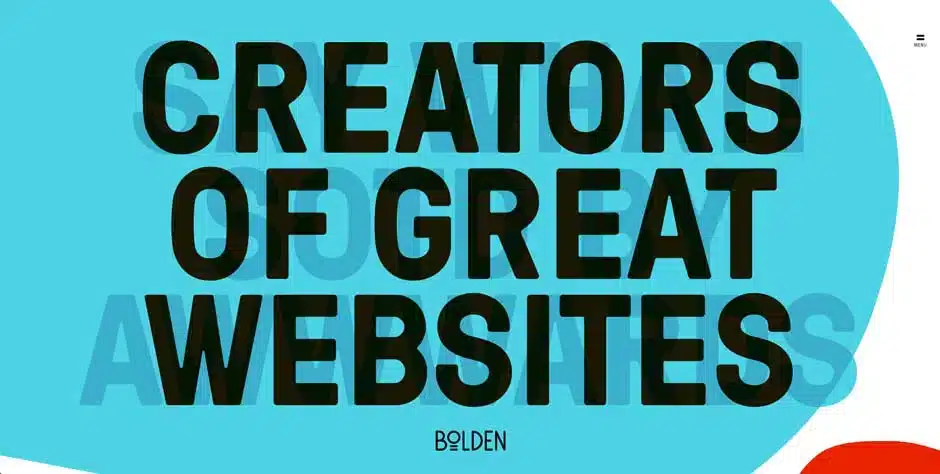
Is this a clever design? Yes, certainly. But is this bad for design? Absolutely!
This is an excellent example of designing for the designer rather than the user: the site seriously reduces the readability of its titles, just to try to provide a novel design. Whoever designed this text also tried to tell users they should move their mouse to corners, which means discovering the titles relies on chance. Plus, even when the title is revealed, the contrast between text and background is poor because you can see overlapping texts. All of this creates an unfriendly site.
GOOD: CULTIVATEDWIT.COM
The Cultivated Wit site is a great counter-example of how clever design doesn’t need to put pressure on usability.

Cultivated Wit’s home page displays an illustrated owl.
On Cultivated Wit’s home page, the illustrated owl will wink at you when you hover over it.
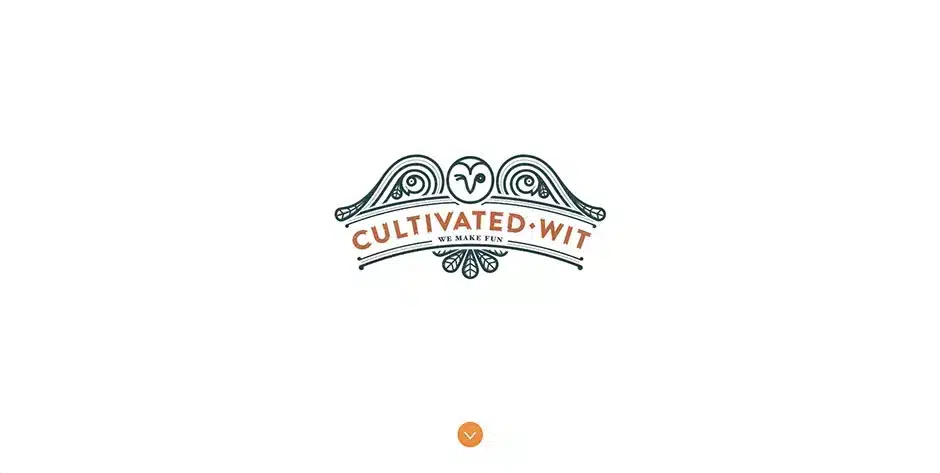
Surprise! The owl winks when you hover over it.
The difference here is that this isn’t an essential part of the site, so it doesn’t reduce usability even if the user doesn’t discover this clever design element.
Additionally, there’s a downward-pointing arrow to suggest that something is below. And when you scroll down, you’ll see this:

Websites can be clever without sacrificing user experience.
The transcript (which is readable and has good contrast) creates a sense of cleverness—unlike what Bolden tried to achieve—without diminishing the site’s user experience. The only minor issue is the text “Join our email club.” This should be more visible, but overall, the Cultivated Wit site is a very good example of clever design without creating a poor user experience.
LESSON LEARNED: BEST PRACTICES
- Clever designs should always make everything simple to navigate.
- Sometimes, clever design can backfire and affect usability.
5. Useless Animations
BAD: PAYPAL MONEY RECEIPT CONCEPT, ON DRIBBLE
Animations are crucial interaction elements of design, but they must always serve a purpose. They should never be done for the sake of animation. Unfortunately, designers tend to have a love affair with animations, partly because animations are so fun to create, but you need to know when to stop.
Vladyslav Tyzin’s animation concept for the PayPal confirmation email, posted on Dribble, is an example of animation done wrong:

The animation is cute but useless. In total, it takes an enormous 3.5 seconds to see the transaction details. A simple receiving fade-in would be more elegant, and because it takes less time, it’s better for the user.
This problem becomes dangerous when designers seemingly can’t get enough animations. As of 2016, Vladyslav’s animation has received more than 500 likes and 8,000 views. This shows a misplaced appreciation that designers have for creating animations for the sake of animation. By understanding the designer’s tendency to prefer epic drops more than representations and captures before giving animations, you’ll save a lot of time and prevent many headaches. Remember, users come to sites for a purpose. We want to show them what they’re looking for in a short time, without holding them up on a museum tour.
GOOD: CHECKOUT ANIMATION FOR STRIPE
When we make animation purposeful, the results can still be great. Look at the checkout animation for Stripe, when the user receives a verification code:

Stripe uses animations to make things much faster: it provides users with information updates (such as “Sent”), even if they haven’t received SMS yet. This prevents users from feeling frustrated about having to wait and provides assurance that an SMS is on its way.
Rachel Nabors, a web animation expert invited to W3C, suggests five principles to keep in mind when designing animations:
- Deliberate animation: believe in each animation before creating it.
- It takes more than 12 principles: Disney’s 12 principles work for movies, but not necessarily for websites and applications.
- Useful and necessary, then beautiful: aesthetics should take a back seat to user experience.
- Make it 4 times faster: good animations are discreet, which means they run quickly.
- Install a switch: for large animations, create an opt-out button.
Conclusion and Final Thoughts
As technology continues to evolve, the importance of good design will only continue to grow, making it an exciting and essential field for designers and businesses alike, as seen in examples of good design and design inspiration.
Good design is an essential part of creating a positive user experience and achieving business goals, as seen in examples of good design.
By understanding the principles of good design and prioritizing usability, accessibility, and aesthetic appeal, designers can create effective design solutions that meet user needs and business goals, as highlighted in articles on design.
The impact of design on our daily lives is significant, and designers have a responsibility to create solutions that are functional, sustainable, and visually appealing, as demonstrated in great examples of design.

