Picking the right website builder for SEO isn’t just a design choice—it’s the bedrock of your entire digital strategy. It’s not about how your site looks, but about the technical foundation that determines whether customers find you on Google at all.
Think of it this way: the right platform is like building a house on solid rock, supercharging your SEO efforts from day one. The wrong one is like building on sand, saddling you with technical headaches that can sink your visibility before you even launch.
Get In Touch
Why Your Website Builder Is a Critical SEO Decision
Make no mistake: selecting a website builder is one of the most consequential decisions you’ll make for your business’s online presence. You aren’t just picking a template; you’re choosing the underlying architecture that will either support or sabotage your ability to rank. This choice directly impacts your site’s speed, mobile experience, and content structure—all critical ranking factors.
A builder designed with SEO in mind gives you the tools to actually compete for your customers’ attention. If you need a refresher on the basics, our guide on what is search engine optimization breaks down the core principles and reinforces why this platform decision is so vital.
Core Evaluation Criteria
When I evaluate website builders for SEO, I focus on a few non-negotiable elements. These are the fundamentals that must be there if you want to win.
- Technical Optimization: How easily can you edit title tags, meta descriptions, URL slugs, and image alt text? For example, can you change a generic product page URL from
/product/123to/handmade-leather-wallets? If you can’t control these basic on-page elements, you’re already behind. - Content Management Flexibility: Does the platform make it simple to create and organize blog posts that attract new customers? A powerful content management system (CMS) is the engine of any serious content strategy designed to drive traffic.
- Site Speed and Performance: Does the builder have a reputation for producing fast-loading websites? Site speed isn’t a “nice-to-have”; it’s a confirmed ranking signal, and a slow platform is a handicap from day one.

As this image illustrates, building a website is a multi-faceted process. Your platform needs to support every aspect of SEO, from the content your visitors see to the technical configurations humming away in the background.
The Business Impact of Your Choice
The stakes are high, and the data backs it up. Organic search drives a massive 46.98% of all website traffic, meaning your ability to rank is directly tied to your bottom line.
The global SEO market hit USD 82.3 billion in 2023 and continues to grow, cementing its role as a primary marketing channel. Your website builder is the vehicle you choose to navigate this competitive space and capture that invaluable traffic.
Get In Touch
What Makes a Website Builder SEO-Friendly
When you’re trying to pick a website builder, it’s easy to get distracted by flashy templates and promises of instant success. But if you’re serious about getting found on Google, the real test of a platform lies beneath the surface, in its technical control and content flexibility.
A truly SEO-friendly builder gives you the tools to speak directly to search engines. It lets you signal what your pages are about, how they’re organized, and why they deserve to rank. This isn’t just a nice-to-have feature; it’s a non-negotiable for any business that wants to build a real presence online.
Foundational On-Page SEO Control
First things first, you absolutely need granular control over your on-page SEO elements. These are the most direct signals you can send to Google about a page’s topic and relevance. If a platform locks these down, it’s a major red flag for anyone serious about SEO.
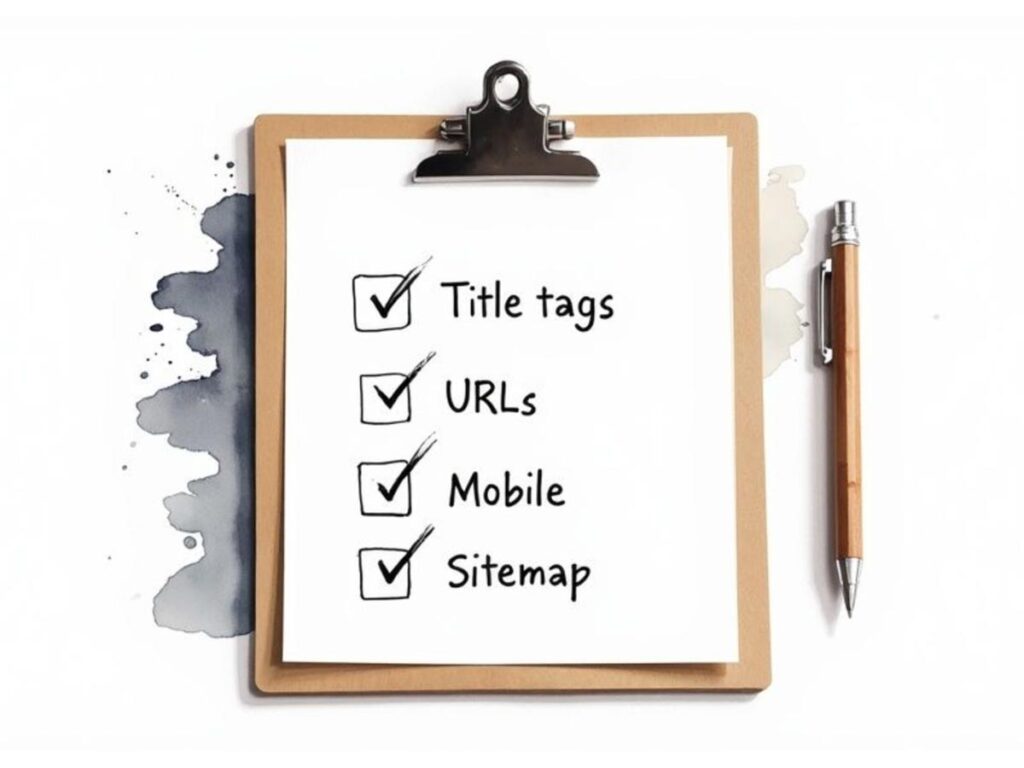
Your must-have checklist should include complete control over:
- Title Tags: This is the clickable headline in the search results. You need the freedom to customize this for every single page, blog post, and product.
- Meta Descriptions: The short blurb under the title tag. While it’s not a direct ranking factor, a persuasive one can dramatically increase your click-through rates and win you business.
- URL Slugs: The end part of a URL (like
/blog/seo-checklist). Clean, descriptive URLs are better for users and search engines alike. - Image Alt Text: This descriptive text tells search engines what your images are about, which is crucial for image search and accessibility.
Actionable Insight: If you’re a local bakery, you need to change a generic page title from “Our Services” to “Custom Wedding Cakes in Boston, MA” just to have a fighting chance. The ability to make that simple edit is the first hurdle any good website builder must clear.
Crucial Technical SEO Capabilities
Beyond the on-page basics, a solid website builder has to manage the technical side of SEO. These features are what make sure your site is easy for search engines to crawl, understand, and index. Get this wrong, and even the best content will remain invisible.
A platform’s technical limitations can create an invisible ceiling on your ranking potential. No amount of great content can overcome a poor technical foundation that prevents search engines from properly indexing your site.
Here are the key technical features you need to confirm:
- XML Sitemap Generation: The platform should automatically create and update a sitemap, which is essentially a roadmap of your website for search engine crawlers.
- Robots.txt Access: You must be able to edit the
robots.txtfile. This file tells search bots which pages to crawl and which to ignore. - Mobile-First Indexing Compliance: With most searches happening on mobile, your site has to look and work perfectly on smaller screens. Google primarily uses the mobile version of a site for indexing and ranking, so this is non-negotiable.
- Intuitive 301 Redirects: When a URL changes, you need a simple way to set up a 301 redirect. This passes the old page’s authority to the new one and prevents users from hitting dead ends.
- Schema Markup Support: Native support for adding structured data (Schema) is a huge plus. It helps search engines understand your content on a deeper level and can earn you “rich snippets” in search results, like star ratings or event times.
The right platform makes these technical tasks manageable. But remember, having the tools is only half the battle. You also have to understand the strategies required to improve Google search rankings to get the most out of them. In fact, fine-tuning these technical aspects is a core part of the website performance optimization techniques we use to boost both user experience and search visibility.
Get In Touch
Comparing the Top Website Builders for SEO
Choosing the right website builder for your SEO goals can feel like comparing apples and oranges. Each platform has its own philosophy, catering to different skill levels, business types, and strategic priorities. To make a smart decision, you have to look past the marketing claims and dig into the practical realities of using WordPress, Wix, Squarespace, and Shopify for serious search engine optimization.
This comparison won’t declare a single “winner.” Instead, it’s about understanding the nuanced trade-offs you’ll face. The goal is to help you pick the platform that genuinely aligns with your specific needs, resources, and technical comfort level.
WordPress: The Unrivaled Powerhouse of Customization
There’s no getting around it—WordPress is the dominant force in the CMS market. In 2025, it powers an estimated 32.8 million live websites, which is roughly 43% of the entire internet. When you look just at the content management system market, its share is a staggering 62-64%. Competitors like Shopify, Wix, and Squarespace barely register in comparison, holding market shares between just 3% to 6%.
This dominance isn’t by accident. It’s the direct result of its open-source foundation, which gives users unparalleled control over every aspect of their site’s SEO.
Practical Example: A Local Plumber Needing Granular SEO Control
Imagine you’re a local plumber whose business lives and dies by hyperlocal search. Your SEO strategy depends on precise location targeting, structured data for your services, and a helpful blog full of “how-to” guides.
- With WordPress: You’d install a plugin like Yoast SEO or Rank Math. Instantly, you have granular control to set a custom title tag like “Emergency Drain Cleaning in Springfield | Open 24/7” and craft a meta description that gets clicks.
- Schema Markup: Using a schema plugin, you can add
LocalBusinessandServicemarkup. This tells Google your exact address, service area, and specific offerings like “hydro-jetting,” which can make a huge difference in local search results. - Blogging: The block editor makes it easy to create media-rich blog posts. You can optimize every element to rank for long-tail keywords like “how to fix a leaky faucet under the sink.”
WordPress doesn’t hold your hand, but it gives you the keys to the entire workshop. For businesses that plan to invest heavily in content and technical SEO, this freedom is its most powerful feature.
Of course, this power comes with responsibility. You’re on the hook for your own hosting, security, updates, and making sure your plugins play nicely together. It demands more technical oversight than an all-in-one builder, but it also offers a completely unlimited ceiling for SEO growth.
Wix: The Guided SEO Experience
Wix has come a long way. After working hard to shed its old reputation for being bad for SEO, it has become a truly formidable platform, especially for small businesses and beginners. Its main strength is making fundamental SEO accessible to everyone.
Instead of throwing you in the deep end, Wix offers a guided, checklist-style process that ensures you cover all the basics without needing to become a technical guru.
Practical Example: A New Photographer Building a Portfolio Site
Let’s say you’re a photographer building a portfolio. You need a visually stunning site that can rank for both your name and service keywords like “newborn photography in Austin.”
- With Wix: The Wix SEO Setup Checklist becomes your guide. It walks you through the essential first steps, like verifying your site with Google, setting title tags for your homepage and galleries, and adding alt text to your images.
- Built-in Tools: Core functions like managing 301 redirects, customizing URL slugs, and even editing the robots.txt file are built right into the dashboard. There are no plugins to install for these necessities.
- Automated Schema: For many page types, Wix automatically adds basic structured data in the background, helping search engines understand your content without any manual work.
This guided approach is ideal for business owners who want to manage their own SEO but don’t have the time or interest to wrestle with a complex backend. The trade-off is that this simplicity creates guardrails. Advanced users might feel constrained by the lack of flexibility for complex schema or deep technical tweaks that WordPress allows.
Squarespace: Design-First with Solid SEO Foundations
Squarespace has always been the platform of choice for those who prioritize aesthetics, famous for its award-winning templates. While it was once considered a bit weak on the SEO front, it now provides all the fundamental tools most businesses need to rank well.
Its real differentiator is how seamlessly it integrates beautiful design with solid SEO functionality. You never have to choose between a gorgeous site and getting the SEO basics right.
Practical Example: A Restaurant Showcasing Its Menu and Ambiance
Consider a high-end restaurant that needs its website to reflect its brand’s elegance while also ranking for “best Italian restaurant in Miami.”
- With Squarespace: The platform is built to showcase stunning, high-resolution imagery. It’s simple to add descriptive alt text to photos of your dishes and decor, a key factor for ranking in Google Images.
- On-Page Simplicity: Editing page titles and meta descriptions is incredibly straightforward and integrated directly into the settings for every page, blog post, and product.
- Integrated Features: Critical elements like sitemaps, SSL certificates, and clean URLs are handled automatically, right out of the box. A design-forward platform can be a game-changer for niche businesses like vacation rentals; if you’re in that industry, this list of the 7 best website builders for vacation rentals might be helpful.
The primary limitation of Squarespace is its lack of extensibility. It handles the core SEO tasks beautifully, but there isn’t a rich app or plugin ecosystem like you’d find with WordPress or Shopify. It gives you what you need, but not much more.
Shopify: The E-commerce SEO Specialist
Shopify isn’t trying to be a general-purpose website builder. It is a finely tuned machine engineered for one thing: selling products online. As a result, its SEO features are laser-focused on the unique demands of e-commerce.
The platform excels at managing the technical complexities that come with online stores, like handling thousands of product pages, collections, and faceted navigation without creating SEO problems.
Practical Example: An Online Store Selling Handmade Jewelry
Imagine a jewelry brand that needs its product pages to rank for very specific terms like “14k gold minimalist necklace” while avoiding duplicate content issues from product variations.
- With Shopify: The platform automatically generates canonical tags on product and collection pages. This is a crucial feature that prevents duplicate content penalties when customers use filters and sorting options.
- Product-Centric SEO: Shopify makes it incredibly easy to edit SEO titles and descriptions for every product and collection. It also has native support for
Productschema, which helps you earn rich snippets like pricing and availability directly in the search results. - App Ecosystem: For more advanced tasks, the Shopify App Store is filled with powerful SEO tools for bulk image optimization, broken link detection, and implementing advanced structured data.
Shopify’s main drawback is its rigid URL structure, particularly for the blog (e.g., /blogs/news/your-post-title). While it’s not a deal-breaker, this lack of total control is a minor but persistent annoyance for SEO purists. If your business is more focused on lead generation or content publishing than e-commerce, Shopify is often overkill and less flexible than other options.
Core SEO Feature Comparison Across Platforms
To get a clearer picture of how these platforms stack up on the fundamentals, it helps to see their core capabilities side-by-side. Remember that with WordPress, functionality is often added via plugins like Yoast or Rank Math, while the other builders have these features built-in.
| SEO Feature | WordPress (with Yoast/Rank Math) | Wix | Squarespace | Shopify |
|---|---|---|---|---|
| Title Tags & Meta Descriptions | Full control on all pages/posts | Full control on all pages/posts | Full control on all pages/posts | Full control, including products |
| Customizable URL Slugs | Yes, full control | Yes, full control | Yes, full control | Partial control (prefixes like /products/ are fixed) |
| Image Alt Text | Yes, easy to add | Yes, easy to add | Yes, easy to add | Yes, easy to add |
| XML Sitemap | Yes, auto-generated and customizable | Yes, auto-generated | Yes, auto-generated | Yes, auto-generated |
| 301 Redirects | Yes, via plugin or .htaccess | Yes, built-in redirect manager | Yes, built-in redirect manager | Yes, built-in redirect manager |
| Robots.txt Access | Yes, full control | Yes, direct editor | No direct access | Yes, limited edits via theme.liquid file |
| Canonical Tags | Yes, auto-generated with manual override | Yes, auto-generated with manual override | Yes, auto-generated | Yes, auto-generated for collections/products |
| Structured Data (Schema) | Highly customizable via plugins | Basic schema is automated; advanced options limited | Basic schema is automated; no custom options | Product and Article schema is native; advanced via apps |
| Blogging Platform | Best-in-class, highly flexible | Good, with all essential features | Good, but less flexible than WordPress | Basic, designed for product support |
This table highlights the core trade-off: WordPress offers unlimited power through plugins, while all-in-one builders provide essential, user-friendly features right out of the box.
Matching the Right Builder to Your Business Needs
When it comes to SEO, there’s no single “best” website builder. The right choice isn’t about finding a magic bullet, but about aligning a platform’s strengths with your specific business model. A one-size-fits-all approach just doesn’t work. The platform that’s perfect for a local plumber is fundamentally different from what a growing e-commerce store or a content-driven publication needs.
Ultimately, the goal is to match the builder’s core DNA to what you need to achieve. This short guide breaks down the top contenders and where they shine.
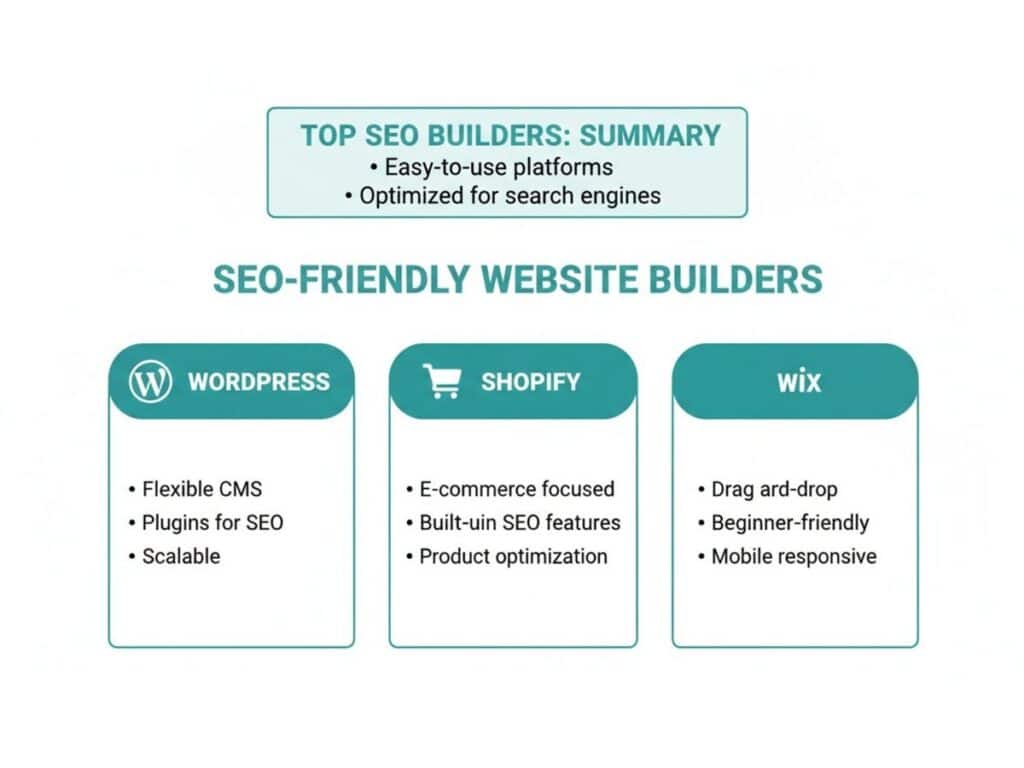
This visual sums it up nicely: WordPress offers near-infinite flexibility, Shopify is built for commerce, and Wix provides an accessible all-in-one package. Your job is to figure out which of these philosophies best serves your business strategy.
For Local Service Businesses
If you’re a plumber, electrician, or consultant, your world revolves around local search. The main objective is landing in the map pack and ranking for keywords like “HVAC repair in Denver.” This requires a platform that’s rock-solid on local SEO fundamentals.
For this job, WordPress combined with a powerful SEO plugin like Yoast SEO or Rank Math is tough to beat. It gives you the precise control needed to implement LocalBusiness schema, which tells Google your address, service area, and hours of operation. This technical detail is a huge lever for local search performance. Plus, its legendary blogging engine is ideal for creating service-specific landing pages and neighborhood-focused content that pulls in highly qualified local customers.
For Content-Heavy Blogs and Publications
For any business built on content—think affiliate marketing sites, online magazines, or massive informational blogs—the game is all about editorial workflow and content organization. You need a system that can handle thousands of articles, complex category structures, and multiple authors without buckling.
In this arena, WordPress.org is in a league of its own. It started as a blogging platform, and those roots show in its unmatched content management capabilities.
- Taxonomy Control: You can build out sophisticated systems of categories and tags to organize a massive library of content, which helps both users and search crawlers navigate your site.
- Plugin Ecosystem: Need an editorial calendar, custom post types, or advanced internal linking automation? There’s a plugin for that.
- User Roles: It offers granular control over user permissions, which is critical when you’re managing a team of writers, editors, and contributors.
When your content is your primary asset, the ability to control, organize, and optimize every single post is non-negotiable. WordPress provides the most powerful and scalable environment for doing just that.
For E-commerce Stores
E-commerce SEO brings its own set of headaches, from managing product variants and optimizing collection pages to implementing Product schema for those eye-catching rich snippets. The right platform has to handle these technical details natively.
Shopify is the undisputed leader here. It was engineered from the ground up for online retail, and its SEO features reflect that focus. The platform automatically generates canonical tags on product and collection pages, which helps you avoid the duplicate content issues that often pop up from URL filters. Its built-in support for product schema means your listings can show pricing, availability, and review ratings right in Google’s search results, often leading to a much higher click-through rate. While its URL structure is more rigid than WordPress’s, the specialized e-commerce toolset is a worthwhile trade-off for most stores.
For Creatives and Portfolio Websites
Creative professionals like photographers, designers, and artists need to strike a delicate balance between a stunning visual showcase and solid SEO fundamentals. The challenge is to feature high-resolution work without killing site speed or losing the ability to rank for service-related keywords.
This is where a platform like Squarespace really shines. It’s famous for its visually impressive, mobile-optimized templates that look great right out of the box. Squarespace also makes it simple to add alt text to your images and manage basic on-page SEO elements like titles and descriptions. It doesn’t offer the deep, technical customization of WordPress, but it provides the perfect equilibrium for creatives who need a beautiful portfolio that people can actually find through search. If visual appeal is a core part of your brand, it’s an excellent choice, as explored in this detailed Squarespace Review from The Style Factory.
Get In Touch
Advanced SEO: Where The Real Differences Emerge
Once you’ve covered the basics of on-page SEO, the true capabilities of a website builder start to show. The best platform isn’t just about what you can do today; it’s about what you’ll need to do tomorrow. As your business grows, you’ll run into more complex SEO challenges that can either accelerate your growth or bring it to a screeching halt.
This is where we move beyond the fundamentals. We’re going to look at how each platform handles the tough stuff: site speed under pressure, scaling for a global audience, and the technical minefield of a site migration. This is what truly separates a good builder from a great one.
Site Speed and Core Web Vitals
Google’s Core Web Vitals (CWV) are no longer a suggestion—they are a core part of the algorithm that directly impacts user experience and rankings. Nailing these scores requires a tight grip on your site’s code, image delivery, and server performance.
- WordPress: This is the “high control, high responsibility” option. Your success here really depends on your choices. You’ll need a top-tier hosting provider, a lean, well-coded theme, and the right optimization plugins (like WP Rocket) to handle caching and shrink file sizes. The power is all yours, but so is the work.
- Wix, Squarespace, and Shopify: These platforms take the opposite approach. As closed ecosystems, they manage the server and backend optimizations for you. This is wonderfully simple, but it means if Google Search Console flags a specific CWV issue, you often have very little direct control to fix it. You’re essentially waiting on them to improve their infrastructure.
Advanced Schema and International SEO
As your marketing gets more sophisticated, you’ll want to move beyond basic schema markup like Product or Article. You might also decide it’s time to target international customers.
This is a major dividing line. With WordPress, tools like Rank Math Pro give you a massive library of schema types and powerful hreflang tag management for going global. You can precisely tell search engines which content is for which language and region.
In contrast, the all-in-one builders usually handle basic schema automatically but make it a real headache to implement anything more complex without diving into custom code. Likewise, managing hreflang tags on a platform like Wix or Squarespace can become a tedious, manual chore, a far cry from the automated solutions available in the WordPress ecosystem.
The ability to easily implement advanced schema and manage international SEO is a key differentiator for platforms designed for scalability. Limitations in these areas can create a significant ceiling on your growth potential in competitive or global markets.
Handling a Site Migration
Moving your website from one platform to another is one of the most stressful and technically difficult tasks in SEO. One wrong move—especially with 301 redirects—and your hard-earned rankings can vanish overnight. This is the ultimate test of a platform’s flexibility.
WordPress gives you total control. You can access the .htaccess file for powerful, server-level redirect rules. If that sounds too technical, there are plenty of plugins that make the process much easier.
Platforms like Shopify and Squarespace offer user-friendly redirect managers, but they can struggle if you need to redirect thousands of URLs in bulk. No matter the platform, a solid migration plan is a must. A well-organized site makes this process infinitely smoother, which is why we always recommend our guide on creating a strong website architecture for SEO before any major changes.
The demand for platforms that balance simplicity and power is fueling incredible growth. The global website builder market, valued at USD 3.06 billion in 2025, is on track to hit USD 6.68 billion by 2030. This boom is largely driven by cloud-based solutions that free businesses from managing their own technical infrastructure. You can find more data on the website builder market on Mordor Intelligence.
Get In Touch
Frequently Asked Questions About Website Builders and SEO
When you’re trying to square a platform’s features with what search engines demand, a lot of questions pop up. Getting clear answers to common concerns is the only way to make a smart decision. Here, we’ll tackle the most common queries about picking a website builder with SEO in mind.
Can I Get to the Top of Google With Any Website Builder?
Technically, yes, you can rank with any modern website builder. But the platform you choose has a huge say in how hard that climb will be. A platform like WordPress gives you immense control and customization through plugins, making it far simpler to nail advanced technical SEO tactics.
On the other hand, builders like Wix and Squarespace have fantastic built-in SEO tools that are great for beginners. The trade-off is that they can sometimes be limiting if you’re building a highly complex site with specific technical needs. Think of your builder as the foundation—a solid one makes it much easier to build a skyscraper.
Is WordPress Too Complicated for a Beginner Who Cares About SEO?
WordPress definitely has a steeper learning curve than the all-in-one builders, but its reputation for being “too complex” is often blown out of proportion for basic use. When you pair WordPress with a good page builder and a dedicated SEO plugin like Yoast SEO, the experience becomes much more guided. These tools practically hold your hand through the setup and optimization process.
The time you invest in learning WordPress upfront often pays massive dividends down the road. You get long-term flexibility and SEO power that other platforms just can’t match, which makes it a smart choice even for determined beginners.
My SEO Features Are Lacking. Should I Switch Website Builders?
Switching platforms is what we call a site migration, and it’s a major project. If you don’t handle it with extreme care, it comes with serious SEO risks. Before you even think about switching, make sure you’ve pushed your current platform to its absolute limits and explored every possible workaround. For a deep dive into what’s involved, you can find great resources on website migration from authoritative sources like the U.S. General Services Administration.
If you keep hitting dead ends that stop you from implementing essential SEO strategies—like being unable to edit your robots.txt file or add schema markup—then a migration might be the only way forward for long-term growth. Just know that you have to plan it meticulously. This means setting up proper 301 redirects for every single URL to protect your existing search rankings. It’s a delicate operation where getting expert help can save you from very expensive mistakes.
Picking the right platform is a critical first step, but it’s just the beginning. To truly own the search results, you need a strategy that marries technical precision with content that connects. At Galant Studios, we specialize in turning websites into powerful engines for business growth.
Discover how our expert SEO services can elevate your brand’s visibility.