When we talk about SEO site architecture, we’re discussing the very blueprint of your website. It’s how you strategically organize your pages and content so that both your audience and search engines can navigate with ease. A meticulously planned structure is your secret weapon for making sure your most valuable content is always discoverable—a non-negotiable for earning top rankings.
Defining the Foundation of Your Website
Imagine your website is a brand-new, sprawling library. Without a logical system—no clear signs, no categorized sections, no index—visitors would be utterly lost. They’d wander aimlessly, frustrated, and ultimately leave without the information they came for. This is precisely what a poor site structure feels like to a user.
A powerful SEO site architecture is that library’s master plan. It creates a crystal-clear map showing where every section, shelf, and individual book (or web page) belongs.
This blueprint creates intuitive pathways that serve two critical audiences at once. For your human visitors, it delivers a frictionless experience, effortlessly guiding them to the answers they need. A positive experience means they’ll stay longer, engage more deeply, and are far more likely to convert.
For search engines like Google, a coherent structure simply makes their job of indexing and ranking your content more efficient.
The Impact on Search Engine Crawling
Your site’s structural efficiency directly influences how search engines find and index your content. Google allocates a finite amount of resources—its “crawl budget”—to every website. If your site is a tangled web of confusing links, its bots will exhaust that budget trying to make sense of the mess. The tragic result? Some of your most important pages may never get indexed at all.
Think of it this way: if a key service page is buried five clicks deep from your homepage, Googlebot might struggle to find it. If it can’t be found, it can’t be indexed, rendering it invisible in search results. You can find more insights on the importance of crawl budget over at clickrank.ai. This is why a well-planned structure isn’t just a “nice-to-have”; it’s the bedrock of any successful SEO strategy.
Why a Solid Architecture Is a Competitive Advantage
Ultimately, a strong site architecture does more than keep your digital house in order. It builds authority and signals trustworthiness to search engines. When you logically group related topics and create a seamless user journey, you tell Google that your website is a high-quality, authoritative resource that deserves to rank.
This organizational framework underpins all your other SEO efforts, from the content you publish to the links you earn. Without it, even the most brilliant blog post can get lost in the digital shuffle, crippling its potential to drive traffic and leads.
An intentional architecture delivers key benefits you can’t afford to ignore:
- Improved User Experience (UX): A logical flow helps people find what they need with zero friction, lowering bounce rates and boosting conversions.
- Enhanced Crawlability: It guarantees search engine bots can efficiently discover and index every valuable page on your site.
- Powerful Link Equity Distribution: A smart structure naturally channels authority from your strongest pages (like your homepage) down to deeper, supporting pages.
To truly build a winning structure, you must master its four core pillars. Each plays a distinct role in optimizing your site for both the people you want to attract and the search engines that bring them there.
The Four Pillars of Effective Site Architecture
| Pillar | Core Function | Primary SEO Benefit |
|---|---|---|
| Hierarchy | Organizing content from broad categories to specific topics, creating a logical “tree” structure. | Improves crawlability and helps search engines understand the topical relevance of different site sections. |
| Navigation | Providing clear menus, breadcrumbs, and internal links that guide users and bots through the site. | Enhances user experience (UX) and distributes link equity effectively across the site. |
| URL Structure | Creating clean, descriptive, and consistent URLs that reflect the site’s hierarchy. | Improves user understanding and provides clear signals to search engines about page content. |
| Internal Linking | Strategically connecting related pages to each other to establish context and pass authority. | Boosts page authority, helps users discover more content, and aids search engine crawling. |
By mastering these four components, you create a robust foundation that not only drives higher search rankings but also turns casual visitors into loyal customers.
The Blueprint for a Strong Website Structure
Think of your website’s architecture as the architectural blueprint for a building. A good blueprint ensures every room is easy to find, the hallways are clear, and visitors never get lost. A great SEO site architecture does the same thing, creating a well-lit, clearly marked space that feels intuitive to both human visitors and search engine crawlers.
The goal is simple: make every piece of your content logical and accessible. Doing this sends powerful signals to search engines that your site is a high-quality, authoritative resource. It all starts with how you organize your content from the top down. A messy foundation leads to a confusing website, but a logical one paves the way for a seamless user journey. For a deeper dive into this initial planning phase, this guide on how to effectively plan your website structure is a fantastic resource.
The Three-Click Rule
One of the most practical principles to live by is the three-click rule. The idea is beautifully simple: any visitor should be able to land on your homepage and find any other piece of information on your site within just three clicks.
Following this rule forces you into a “flat” architecture, which is far superior to a deep, complex one where pages are buried five or six levels down. Deep structures frustrate users and can exhaust a search engine’s crawl budget before it ever finds your most important content.
A flat architecture keeps your most valuable pages close to the high-authority homepage. This proximity makes it far easier for search engines to discover, index, and understand their importance, which is a huge factor in their ability to rank well.
Creating Logical URL Structures
A page’s URL is much more than a simple web address. It’s a signpost. A well-crafted URL gives both users and search engines instant context about what the page contains and where it fits within your site’s hierarchy.
To get this right, focus on a few key elements:
- Clarity and Simplicity: Your URLs must be human-readable. Ditch the long strings of random numbers and confusing parameters.
- Keyword Integration: Placing your page’s primary keyword in the URL is a direct and powerful relevancy signal for search engines.
- Hierarchical Consistency: A URL should mirror the site’s structure. For instance,
yourdomain.com/services/seo-auditsclearly shows the page’s place in the hierarchy.
This logical approach isn’t just a technical SEO box to check; it reinforces your site’s entire SEO site architecture and makes navigation predictable and user-friendly. To really master this, check out our complete guide on how to create SEO-friendly URLs.
Harnessing Topic Clusters for Authority
To truly elevate your site structure, you need to organize content into topic clusters. This is a powerful strategy where you create a central “pillar page” covering a broad topic in great detail. This pillar then acts as a hub, linking out to numerous “cluster pages,” each diving deep into a specific subtopic.
For a practical example, imagine a financial services firm wants to establish authority around “Retirement Planning.” They would create a comprehensive pillar page covering the entire topic. From there, they’d build out cluster pages on related themes, such as:
- “Guide to 401(k) Investments”: A detailed look at managing employer-sponsored retirement plans.
- “Roth IRA vs. Traditional IRA”: A focused comparison to help users choose the right account.
- “Calculating Your Retirement Needs”: An actionable article with tools for estimating future expenses.
This model achieves two critical goals. First, it builds an interconnected web of content that keeps users on your site longer, guiding them from one relevant piece to the next. Second, it screams expertise to search engines. By covering a subject from every angle, you build immense topical authority, making it easier for every single page in that cluster to rank. This is a cornerstone of modern, sophisticated SEO.
Using Internal Linking to Build Authority

Think of your website as a city. Internal links are the roads that connect everything, guiding traffic and showing people the way. These aren’t just for getting from Point A to Point B; they’re a strategic network that distributes link equity—or ranking power—from your strongest pages to your deeper content.
This web of links is what search crawlers follow to map out your site and understand its hierarchy. A well-planned network tells them exactly which pages are the most important. Just like in a city, your homepage acts as the central highway, leading to main roads (category pages), which then branch out into smaller streets (individual product or blog pages). Every link you place is like a road sign, pointing to the most valuable destinations.
Why Internal Linking Is So Important
A smart internal linking strategy does two critical jobs at once: it shapes how users navigate your site and how search engine crawlers understand it. When done right, visitors find what they need, stay longer, and bounce less.
At the same time, those links channel authority to your most important pages, helping them rank higher. It’s a win-win.
- For users: It creates a better experience by guiding them to relevant content without any friction.
- For SEO: It ensures link equity flows efficiently, boosting your search rankings.
The Different Types Of Internal Links
Not all links are created equal. Different types serve unique purposes in building a coherent SEO site architecture.
Navigational Links: These are the big ones—the links in your main menu, headers, and sidebars. They form the skeleton of your site map and give both users and search bots a clear path to your primary sections.
Contextual Links: These are the links you find woven directly into your content, like within a blog post or on a product page. They connect related topics and are incredibly powerful for creating a natural flow that keeps users engaged and clicking deeper into your site.
Footer Links: Tucked away at the bottom of the page, footer links provide site-wide access to essential but less-trafficked pages like your contact info, privacy policy, or terms of service. They’re useful without cluttering up your main navigation.
Optimizing Your Anchor Text
If an internal link is a road, the anchor text is the sign that tells you where it leads. This is the clickable text itself, and it provides crucial context for both users and search engines.
Always aim for descriptive phrases that naturally include your target keywords. For instance, linking the phrase “SEO site architecture best practices” to a guide on that exact topic is far more effective than using vague anchors like “click here” or “read more.” Those generic phrases offer search engines zero information about the destination page.
A few quick guidelines for anchor text:
- Keep it concise but descriptive.
- Use relevant keywords naturally, without stuffing.
- Make sure the text accurately reflects the content of the linked page.
“Well-chosen anchor text improves relevance signals and enhances page authority.”
Best Practices For Link Equity Flow
To get the most out of your internal links, you need a plan for how authority will flow through your site.
- Start by linking from your high-authority pages (like the homepage or major pillar content) to other pages you want to boost.
- Create topic clusters by having a main pillar page link out to all its related, more specific sub-topic pages.
- Routinely check for orphaned content—pages with no internal links pointing to them—and find relevant places to link to them.
- Keep your site structure shallow. A user or crawler should be able to reach any important page within three clicks from the homepage.
For more on how this fits into a bigger picture, you can review our guide on link building strategy to combine internal and external strategies.
And if you’re running an e-commerce site, the value of this is amplified. You can learn more by reading about the importance of internal linking for boosting Shopify SEO.
Your Link Auditing Checklist
A website’s link structure isn’t something you can set and forget. Regular audits are key to keeping it healthy and effective.
- Use a crawler tool to find and fix any broken internal links.
- Hunt down orphan pages that have been left disconnected from the rest of your site.
- Double-check that your anchor texts are relevant and descriptive.
- Review your navigation and footer links to ensure they still make sense.
Performing these checks ensures that link equity is always flowing where you need it most.
A Real-World Example
An e-commerce retailer decided to overhaul its internal linking by creating a more logical network between its category pages, product pages, and blog content. They started using contextual links within their articles to point readers toward related products and seasonal collections.
The results were impressive.
- Strategic deep linking to a holiday sales page led to a 25% increase in its organic traffic.
- The improved site navigation increased the average session duration by 45 seconds.
| Link Type | Function | Measurable Impact |
|---|---|---|
| Navigational | Menu and breadcrumb links | ↓ Bounce rate by 9% |
| Contextual | In-body links between related topics | ↑ Page views per session |
| Footer | Site-wide links to crucial info pages | ↑ Compliance page visits |
A deliberate internal link structure transforms a static sitemap into a dynamic ranking tool.
Tools like Screaming Frog or the Ahrefs Site Audit feature are perfect for visualizing your link structure and spotting opportunities for improvement.
Key Takeaways
- Internal links are the pathways that guide users and search crawlers through your site.
- A strategic mix of navigational, contextual, and footer links is needed to build a strong hierarchy.
- Clear, keyword-rich anchor text is non-negotiable for providing context.
- Regular audits are essential for fixing broken links, finding orphan pages, and ensuring link equity is distributed effectively.
Ultimately, a robust internal linking strategy turns your site architecture into a high-performance engine, driving both user engagement and search rankings.
Choosing the Right Architectural Model for Your Site
Once you’ve grasped the core principles, the next step is putting them into practice by choosing an architectural model that actually fits your website. Not all sites are created equal. An e-commerce store has completely different organizational needs than, say, a step-by-step online course. Picking the right SEO site architecture from the very beginning is a foundational decision that impacts everything from user experience to how well you can scale in the future.
This choice dictates how both people and search engine crawlers find their way around your content. For most websites, the most effective and widely used approach is the hierarchical structure, often called the silo model. It works by organizing information from broad, high-level categories down into more focused topics, creating a flow that’s logical and easy to follow.
The image below gives a great visual of how this hierarchical model works, showing how primary categories branch out into more detailed subcategories, with everything held together by a smart internal linking strategy.
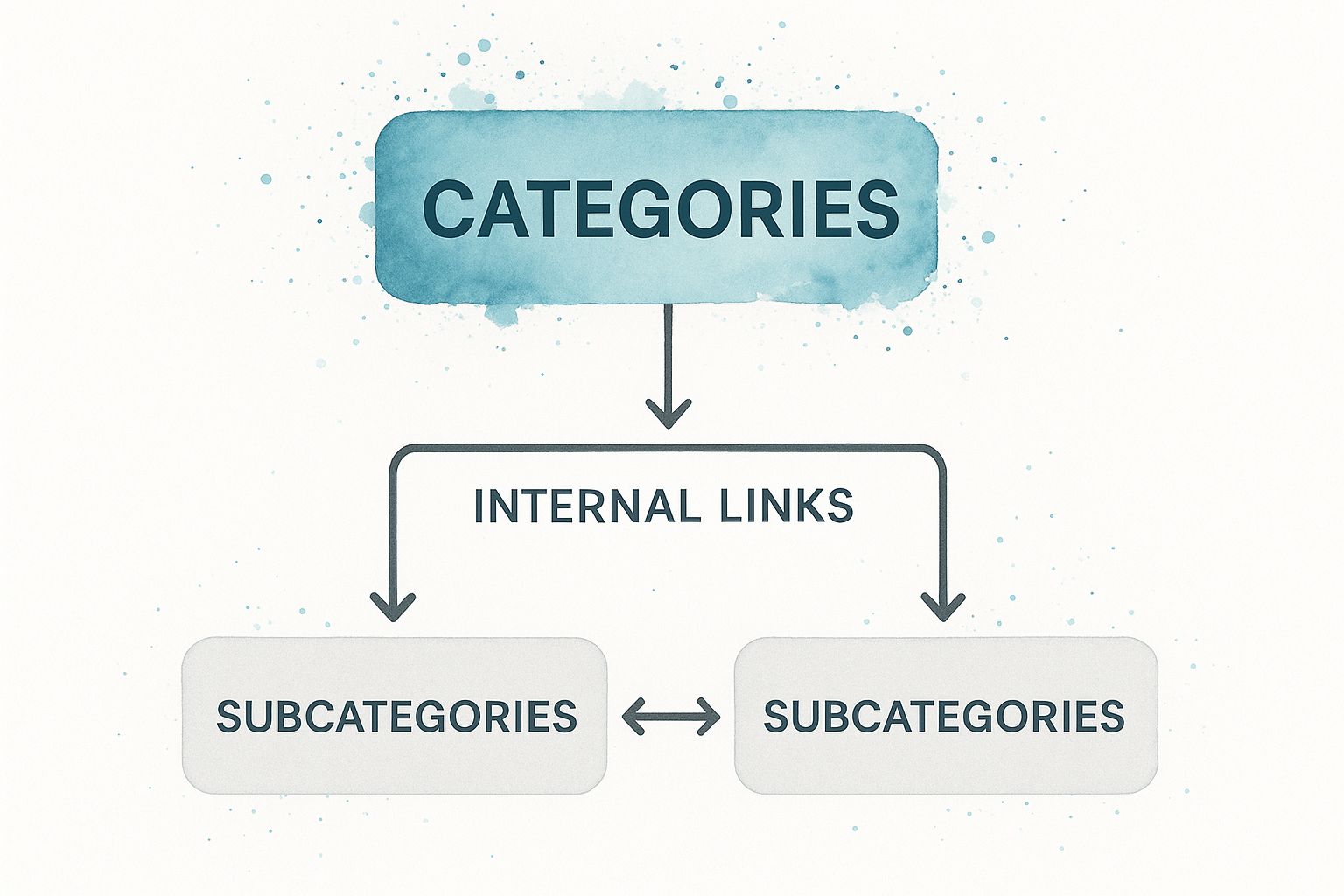
As you can see, a silo structure neatly groups related content together. This makes it incredibly easy for search engines to recognize your topical authority and just as easy for your users to find exactly what they’re looking for.
The Hierarchical (Silo) Model
The hierarchical model is really the gold standard for most content-heavy websites, from sprawling e-commerce platforms to in-depth company blogs. Think of it like a pyramid or an organization chart. At the very top, you have the homepage. Just below that sit a few key categories, which then branch out further into more specific subcategories and, finally, individual pages.
This structure is a powerhouse for building topical relevance. By grouping all the content about a specific subject into a single “silo,” you send a powerful signal to search engines that your website is an authority on that topic.
Imagine a digital camera store. Its structure might look something like this:
- Homepage -> DSLR Cameras (Category) -> Canon DSLRs (Subcategory) -> Canon EOS 5D Mark IV (Product Page)
- Homepage -> Lenses (Category) -> Telephoto Lenses (Subcategory) -> Specific Lens Model (Product Page)
The real magic of the silo model is its ability to channel link equity so effectively. Authority flows naturally from the broad, powerful pages down to the more specific, long-tail pages, giving them the boost they need to rank.
This controlled flow of authority, combined with its clear thematic organization, makes the silo model the go-to choice for any site that wants to establish deep expertise across multiple subject areas.
The Sequential Model
On the other end of the spectrum is the sequential model, which guides users along a very specific, linear path. It’s a much simpler structure where you move from one page to the next in a predefined order. This model is less common, but it’s perfect for situations where information absolutely must be consumed in a particular sequence.
Think of an online course curriculum, a multi-part “how-to” guide, or the onboarding flow for a new software user. The entire goal is to get the user from page one to page two, and then to page three, with no detours.
- Key Advantage: It creates a highly controlled user journey, which is great for minimizing distractions and making sure content is experienced in the right order.
- Main Drawback: It’s incredibly rigid. This model just doesn’t work for websites where users expect to browse freely and explore different topics, like a news site or online retailer.
Its simplicity is its strength, but its application is narrow. For most businesses, this model would feel far too restrictive. The Wikipedia entry on website architecture offers a solid overview of how these different structures are visually conceptualized.
Comparing Site Architecture Models
So, which model is right for you? It all comes down to your website’s goals and the type of content you have. To make the decision clearer, let’s compare the two primary models side-by-side.
| Model Type | Best For | Key Advantage |
|---|---|---|
| Hierarchical (Silo) | E-commerce sites, large blogs, corporate websites, and any site with diverse content categories. | Excellent for building topical authority, scalable, and intuitive for users to navigate. |
| Sequential (Linear) | Online courses, tutorials, onboarding processes, and campaign-specific landing page funnels. | Provides a controlled user path, ideal for processes that require a step-by-step progression. |
For the vast majority of businesses looking to build a powerful SEO foundation, the hierarchical model is the way to go. It supports content growth, makes navigation a breeze for users, and clearly communicates your site’s expertise to search engines. Ultimately, it’s the most reliable choice for achieving long-term success.
Common Architecture Mistakes That Hurt Your SEO

Building a logical SEO site architecture is one of the smartest moves you can make, but even the best-laid plans can go wrong. There are a few common, and often subtle, mistakes that can quietly sabotage your SEO, making your site a maze for search engines and a headache for visitors.
Spotting and fixing these issues is more than just a technical chore; it’s about unlocking the ranking potential you’ve been missing. If you can steer clear of these pitfalls, the structure you’ve worked so hard to build will finally do its job, leading both search bots and customers straight to your most important content.
Creating an Excessively Deep Structure
One of the most frequent and damaging mistakes I see is a site structure that’s just too deep. This is what happens when you bury important pages four, five, or even more clicks away from the homepage. It’s a direct violation of the classic “three-click rule” and causes a cascade of problems.
Pages buried deep within a site get very little link equity passed down from powerful pages like your homepage. To a search engine, this low visibility signals that the content isn’t very important, making it incredibly difficult for those pages to ever rank. It also burns through your crawl budget, as search engines give up before they even find your best content.
- Example of a Deep Structure:
Homepage > Services > Digital Marketing > SEO > Technical SEO > SEO Audits(5 clicks) - Corrected Flat Structure:
Homepage > SEO Services > Technical SEO Audits(2 clicks)
That simple change makes the “Technical SEO Audits” page exponentially more visible and authoritative in the eyes of Google.
Inconsistent and Unclear URL Naming
When your URL structure is all over the place, it creates confusion for everyone—users and search crawlers alike. URLs filled with random characters or lacking a clear, logical pattern don’t offer the contextual clues needed to understand what a page is about or where it fits in the grand scheme of your site.
A solid SEO site architecture depends on predictable, keyword-rich URLs. Think of them as a clear roadmap that reinforces the silo structure you’ve built.
An inconsistent URL is like a misleading street sign. It might eventually get you to the right place, but the journey is confusing and inefficient, eroding trust along the way.
The fix is to establish a clear naming convention and stick to it religiously. For instance, all of your service pages might follow a yourdomain.com/services/service-name pattern. This kind of consistency reinforces your site’s logic and makes it far more intuitive to navigate.
Neglecting Breadcrumb Navigation
Forgetting to add breadcrumb navigation is a huge missed opportunity for both user experience and SEO. Breadcrumbs are the little navigation trails, usually at the top of a page, that show users exactly where they are within your site’s hierarchy. They provide a clear path back home.
They pull double duty:
- For Users: Breadcrumbs keep people from hitting the “back” button a dozen times. When a visitor lands directly on a deep page from search, breadcrumbs help them get their bearings and explore related categories, which can significantly reduce your bounce rate.
- For Search Engines: They are a fantastic way to strengthen your internal linking structure. They clearly map out the relationships between pages, giving crawlers a crystal-clear understanding of your site’s layout.
Allowing Orphan Pages to Exist
Orphan pages are the digital equivalent of a message in a bottle—they exist, but they have no connections to the rest of your site. Because search engine crawlers discover content by following links, these pages are completely invisible to them. If a page can’t be crawled, it can’t be indexed, and it will never show up in search results.
These pages are often the unintended byproduct of site migrations, content deletions, or simple human error. The only reliable way to find them is to run a site audit with a crawling tool. Once you find an orphan page, the solution is simple: build relevant internal links to it from other pages to bring it back into your SEO site architecture.
A well-oiled website should have zero orphan pages. Keeping your site crawlable is essential, and you can learn more about guiding search bots by understanding robots.txt best practices.
Common Questions About Site Architecture
Even with the best plan, you’re bound to have questions when you start refining your website’s blueprint. A well-designed SEO site architecture isn’t a “set it and forget it” task; it’s a living part of your digital strategy. Getting the details right is what separates a good site from a great one. Here are some of the most common questions we hear, with direct, clear answers to help you move forward with confidence.
How Often Should I Audit My Site Architecture?
Think of a full-scale architecture audit as an annual health checkup for your website. It’s best to perform one at least once a year. This yearly review gives you a chance to step back, assess the overall structure, spot new opportunities for content clusters, and make sure your navigation is still serving your users and your business goals.
That said, an annual audit is just the baseline. Certain events should trigger a more immediate review.
- During a Major Redesign: If you’re planning a significant visual or functional overhaul, you absolutely need to conduct a full architectural audit before you start. This ensures your new design is built on a rock-solid SEO foundation from day one.
- Following a Content Overhaul: Anytime you add, remove, or merge large chunks of content, you need to check how those changes affect your site’s hierarchy and internal linking.
- For Dynamic, Fast-Growing Sites: Big e-commerce stores or news sites that add new content daily should probably do a quick check-in every quarter. This helps you catch issues like excessive page depth or new orphan pages before they become serious problems.
The key is to treat your site architecture as an evolving framework that grows with your business, not as a static project you completed once.
Can I Change My Site Architecture After My Website Is Live?
Yes, you can—and sometimes you absolutely should to improve performance. But you have to approach it with serious caution and a meticulous plan. Making the wrong moves here can be catastrophic for your SEO.
Big structural changes, like completely reorganizing your main categories or changing your entire URL structure, are major technical projects. The single most important step is to map out a comprehensive 301 redirect plan. This means creating a detailed map that permanently redirects every single old URL to its new home.
A 301 redirect is a permanent redirect that passes between 90-99% of link equity to the new page. If you fail to implement these correctly, you’ll lose hard-earned authority and send users straight to frustrating 404 error pages.
On the other hand, smaller tweaks are just a normal part of running a website. Things like adding a new subcategory, strengthening the internal links on a key page, or updating your main navigation are generally safe and even encouraged as your site evolves.
What Is the Difference Between Site Architecture and a Sitemap?
This is a common point of confusion, but the distinction is incredibly important. While they are related, site architecture and a sitemap serve completely different functions.
Let’s use a house analogy.
- Site Architecture is the blueprint of the house. It’s the thoughtful design that dictates the layout—where the rooms are, how they connect, and the hallways a person uses to move from the kitchen to the bedroom. It’s the logical structure that makes the house work for the people living in it.
- A Sitemap is the inventory list for the house. It’s just a simple file (usually an XML file) that lists every single room (URL). You hand this list to search engines to make sure they don’t miss any rooms when they come to inspect the property.
In short, your architecture shapes the user experience and establishes the relationship between your pages. The sitemap is simply a technical file that helps search engine crawlers discover all of your content. You can read more about how Google uses them in their official sitemap documentation.
How Does Site Architecture Affect User Experience?
A strong SEO site architecture is the invisible scaffolding that supports a great user experience (UX). When a site is logically organized with clear navigation, people can find what they need without thinking or getting frustrated. This effortless journey is a huge positive signal to search engines.
A well-planned structure improves the user experience in a few direct ways:
- It Lowers Your Bounce Rate: When people can easily find what they came for, they are far less likely to give up and leave.
- It Increases Time on Site: Intuitive navigation naturally encourages users to explore, leading them to discover more of your content.
- It Boosts Conversion Rates: A clear path from a blog post to a product page makes it simple for users to take the actions you want them to.
Simple features tied to architecture, like breadcrumb navigation, also make a big difference. They show users exactly where they are on your site, which gives them confidence and control. By making information accessible, you build trust and create an experience that keeps people coming back.
Ready to build a website with an impeccable architecture from the ground up? The team at Galant Studios specializes in creating websites where expert SEO is woven into every aspect of design and development. We ensure your site is fast, user-friendly, and perfectly structured to climb the search rankings. Visit us at galantstudios.com to learn how we can help your business grow.