
In today’s digital marketplace, speed isn’t just a feature—it’s the foundation of a winning user experience and a critical driver of your conversions. A mere one-second delay in page load time can slash conversions by a staggering 7%, directly impacting your sales, search rankings, and brand perception. A slow website doesn’t just frustrate visitors; it signals to search engines like Google that you offer a poor user experience, hurting your visibility. This article goes beyond generic advice, delivering nine powerful website performance optimization techniques designed for immediate impact.
Each point is packed with actionable steps, practical examples, and persuasive insights to help you transform your site’s performance into a competitive advantage. For those seeking a more condensed guide, exploring these 10 actionable website performance optimization tips can offer additional practical strategies.
This guide will walk you through everything from sophisticated server-side enhancements like database query optimization to critical front-end refinements such as lazy loading and code minification. Our goal is to equip you with the specific knowledge to implement these strategies effectively. By applying these methods, you will deliver a seamless, high-speed experience that captivates users, drives engagement, and ultimately boosts your bottom line. Let’s build a faster, more profitable website.
1. Harness a Content Delivery Network (CDN) for Global Reach
A Content Delivery Network (CDN) is an essential tool in any modern arsenal of website performance optimization techniques. Imagine a global network of servers, each holding a copy of your site’s static content—images, stylesheets (CSS), and scripts (JavaScript). When a visitor from Tokyo accesses your site, a CDN delivers that content from a server in Asia, not from your origin server in New York.
This simple change dramatically cuts latency—the physical time it takes for data to travel. For businesses with a national or global audience, a CDN isn’t a luxury; it’s a necessity for competing effectively. For a real-world example, media giants like Netflix and Amazon Prime Video rely on massive CDNs to stream high-definition video to millions of users simultaneously without buffering. By closing the physical distance to your users, you slash load times, create a superior user experience, and reduce the strain on your main server.
Key Benefits and Implementation
Implementing a CDN, such as Cloudflare or Amazon CloudFront, is often as simple as updating your domain’s DNS settings. The benefits are immediate: faster load times, lower bandwidth costs, and enhanced security with features like DDoS attack mitigation. Before you begin, a thorough performance audit can help you prioritize your efforts; a comprehensive guide to website performance optimization can help you build a complete strategy.
The following infographic highlights the tangible impact a CDN can have on your website’s core metrics.
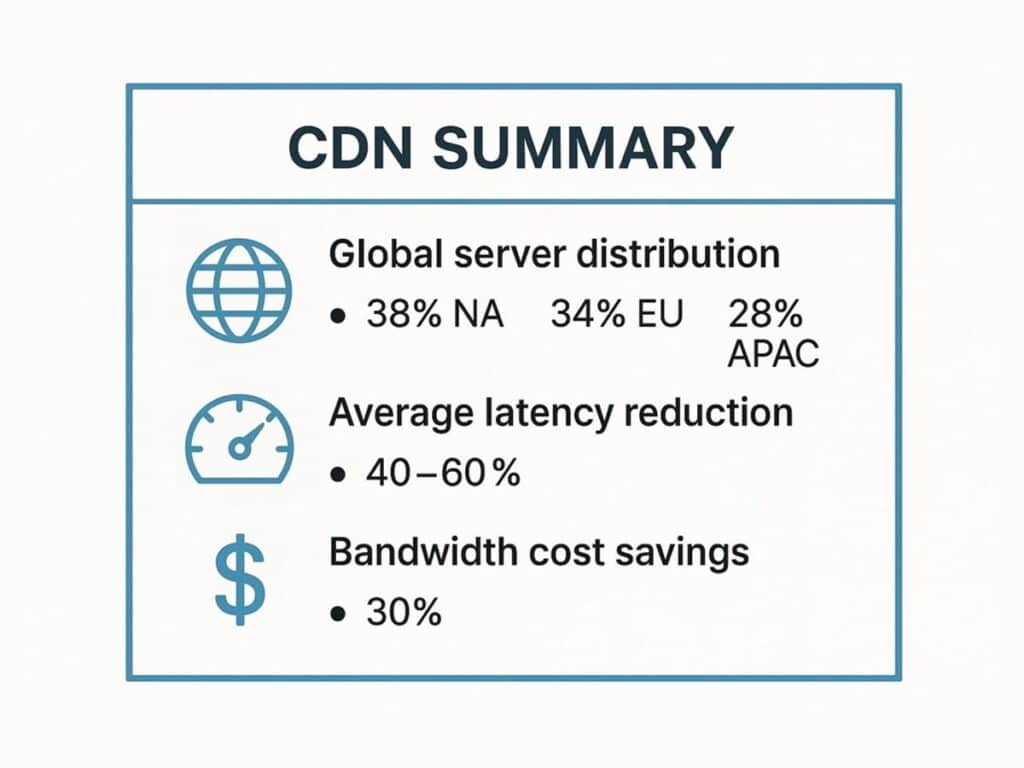
As you can see, the value extends far beyond speed, offering significant cost savings and a more reliable experience for users everywhere. For a successful implementation, configure your cache headers correctly to tell the CDN how long to store your content, ensuring a perfect balance between performance and content freshness.
2. Image Optimization and Compression
If your website were a highway, large, unoptimized images would be rush-hour traffic. Image optimization is one of the most impactful website performance optimization techniques because images often make up the bulk of a page’s total weight. The process involves reducing image file size through smart compression and format selection, without any noticeable drop in visual quality.
The payoff is huge. Faster page speed directly boosts user engagement and is a confirmed ranking factor for search engines. For an e-commerce site, this means a visitor can browse products without frustrating delays, leading to lower bounce rates and more sales. A practical example is Pinterest, which reduced image sizes by 40% using modern formats like WebP, leading to a much faster, more engaging user experience on a platform built entirely around visuals.
Key Benefits and Implementation
You can implement image optimization manually with tools like Squoosh or automate the process entirely with plugins and build tools. The core goals are to shrink file sizes, serve correctly scaled images for every device, and choose the right format for each use case. This leads to faster page loads, lower bandwidth bills, and better SEO. For specific, actionable advice, explore this guide on how to optimize website images for maximum performance.
The following infographic illustrates the crucial trade-off between file size and image quality.
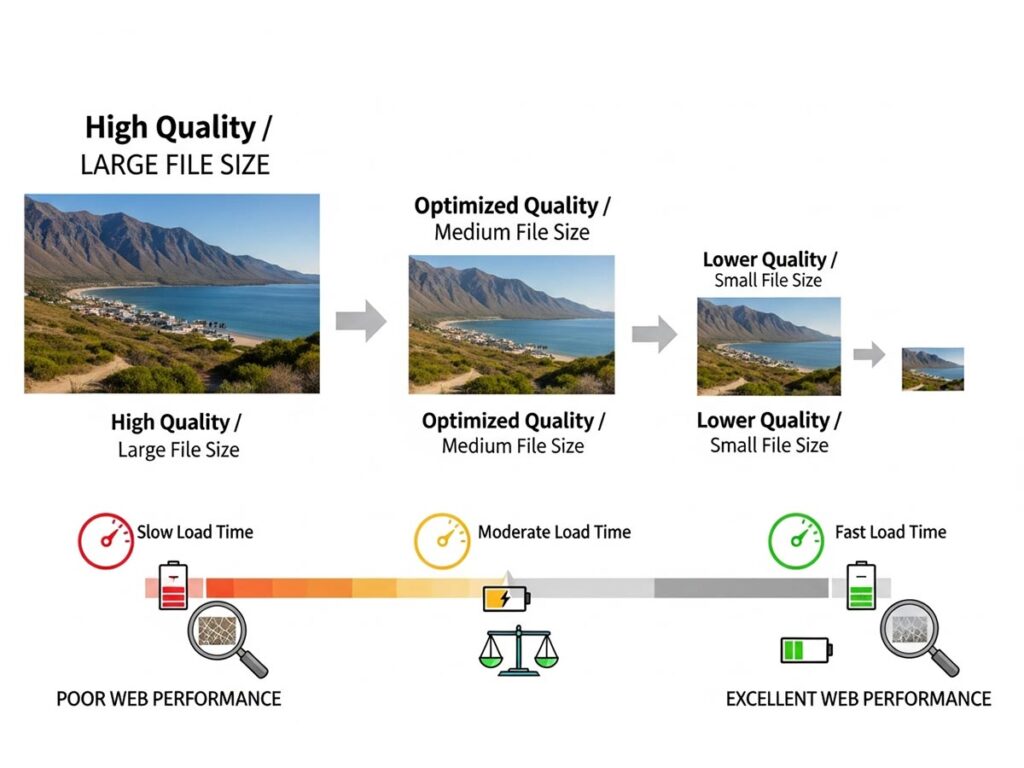
As shown, a small, often imperceptible, reduction in quality can yield a massive decrease in file size. A key practical step is to implement responsive images using the srcset attribute in HTML. This ensures a mobile user on a 4G connection downloads a small, optimized image, while a desktop user on a fast connection gets a high-resolution version.
3. Leverage Browser Caching for Instantaneous Return Visits
Browser caching is a powerful website performance optimization technique that turns a first-time visitor into a repeat user who experiences near-instant load times. It works by instructing a visitor’s browser to save local copies of your site’s static resources—like your logo, CSS files, and JavaScript. When that user returns, their browser loads these files directly from their device’s storage instead of re-downloading them, making the experience feel incredibly fast.
This is achieved using HTTP cache headers, which are simple directives your server sends. Think of it as telling the browser, “You can hang on to this logo file for a year because it’s not going to change.” Large-scale sites like Wikipedia and the U.S. government’s NIST website use aggressive caching policies for their static assets. This simple technique reduces server load, saves user bandwidth, and creates a seamless experience that encourages users to come back.
Key Benefits and Implementation
Implementing browser caching involves configuring your web server (like Apache or Nginx) or CDN to send the correct Cache-Control headers. The primary benefits are dramatically faster load times for repeat visitors, reduced server strain, and lower bandwidth costs. A practical strategy is to set long expiration times (e.g., one year) for assets that never change, like brand assets, and shorter times for files that might be updated more frequently.
To ensure users always get the latest version when you do make changes, use a technique called “cache busting.” This involves renaming your files slightly with a version number (e.g., style-v1.2.css), which forces the browser to download the new copy. You can learn more about improving website speed on galantstudios.com for a deeper understanding of this and related techniques.
4. Code Minification and Compression
Code minification and compression are two essential website performance optimization techniques that work together to shrink the size of your site’s core files: HTML, CSS, and JavaScript. Minification is like editing a document down to its bare essentials—it strips out all unnecessary characters like comments, whitespace, and line breaks without altering the code’s function. Compression, using algorithms like Gzip or Brotli, then takes those lean files and shrinks them even further before they are sent to the user’s browser.
This one-two punch drastically reduces the amount of data transferred, leading to faster download and processing times. This isn’t a minor tweak; it’s a standard practice for every major tech company. For example, by minifying and compressing its code, Amazon ensures its homepage loads quickly even for users on slower mobile networks, directly protecting its conversion rates. For any modern website, this is a non-negotiable step.
Key Benefits and Implementation
Implementing minification and compression is typically automated in modern development workflows using tools like Webpack, Parcel, or specialized compilers. Server-side compression is then a simple configuration change on your web server.
The benefits are straightforward: dramatically smaller file sizes, which lead to faster page loads and lower bandwidth costs. To implement this effectively:
- Automate Everything: Integrate minification into your build process. This ensures every new release is automatically optimized.
- Keep Your Originals: Always work from the original, unminified source code. It’s essential for debugging and future development.
- Enable Server Compression: Configure your server to use Brotli first, with Gzip as a fallback. Brotli, developed by Google, generally offers better compression ratios.
- Test After Minifying: Always perform a thorough quality assurance check after implementing minification to ensure no functionality was accidentally broken.
5. Implement Lazy Loading for Non-Critical Assets
Lazy loading is a clever website performance optimization technique that dramatically improves initial page load speed by not loading everything at once. It defers the loading of “below-the-fold” resources—like images, videos, or comment sections—until they are just about to scroll into the user’s view. This lightens the initial page payload, allowing the browser to render the visible content much faster and creating the perception of an incredibly fast website.
This approach is a game-changer for content-heavy pages, such as e-commerce category pages, news articles, or social media feeds. Think about Instagram or Medium; you can start engaging with the content at the top of the page instantly, while images further down load seamlessly as you scroll. By prioritizing what the user sees first, you deliver immediate value and keep them engaged.
Key Benefits and Implementation
Implementing lazy loading is now easier than ever. The primary benefits are a faster initial page load, reduced bandwidth use (especially critical for mobile users), and an improved Time to Interactive (TTI) score. For a simple and effective solution, modern browsers natively support the loading="lazy" attribute for images and iframes, which often requires no JavaScript at all.
For broader compatibility or more advanced control, JavaScript solutions using the highly efficient Intersection Observer API can detect when an element is about to become visible. A crucial implementation detail is to use placeholders that reserve the exact dimensions of the final image. This could be a lightweight, blurred version of the image or a simple colored box. This practice prevents the page layout from shifting as content loads in, which avoids a jarring user experience and a poor Cumulative Layout Shift (CLS) score.
6. Critical CSS Inlining
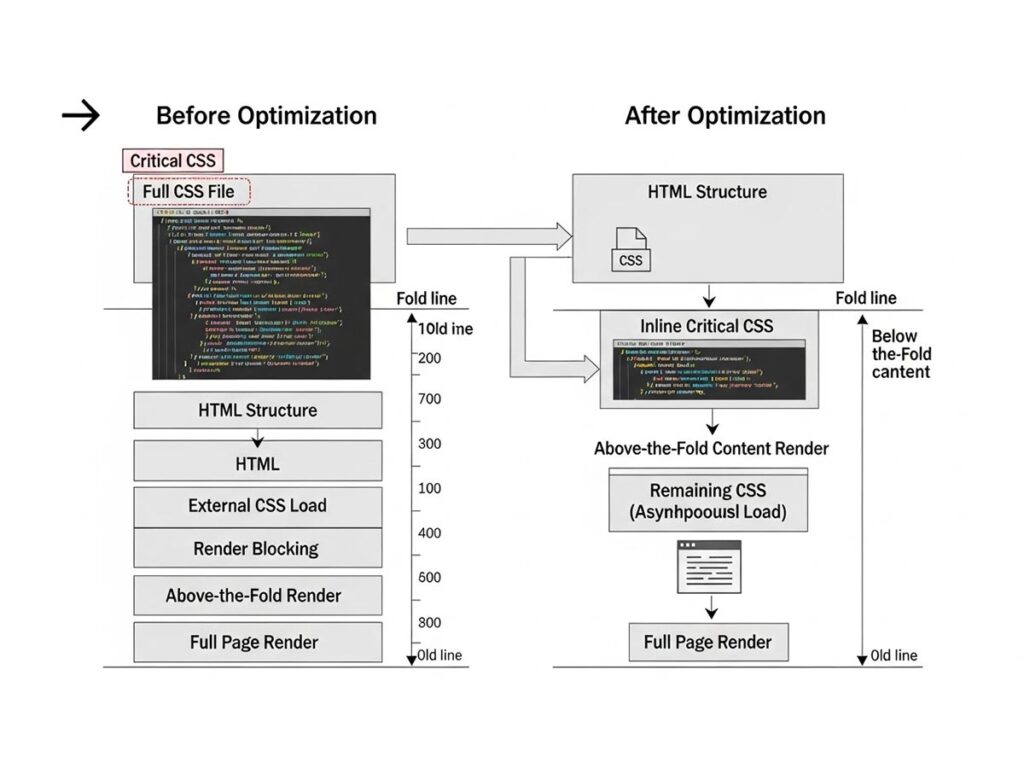
Critical CSS inlining is an advanced website performance optimization technique that delivers a near-instant visual experience. The strategy involves identifying the absolute minimum CSS required to style the “above-the-fold” content—the part of the page a user sees without scrolling. This small block of “critical” CSS is then embedded directly into the HTML file’s <head> section, while the rest of the stylesheet is loaded asynchronously in the background.
This method directly tackles a common performance killer: render-blocking CSS. Normally, a browser won’t display anything until it has downloaded and parsed all the linked CSS files. By inlining the essential styles, you give the browser everything it needs to start painting pixels on the screen almost immediately. This dramatically improves perceived speed and key metrics like First Contentful Paint (FCP). It’s a technique used by high-traffic news sites like the BBC to make their content feel instantaneous.
Key Benefits and Implementation
Manually identifying critical CSS is tedious and error-prone. The best approach is to automate the process using tools like the Critical npm package, which can analyze your pages and generate the critical-path CSS for you.
The primary benefit is a significantly faster initial render, which makes your site feel faster and can directly improve user retention and conversions. To implement this effectively:
- Automate the Extraction: Use a build tool to generate critical CSS for each unique page template (e.g., homepage, product page, blog post).
- Stay Under 14KB: Aim to keep the inlined CSS small. The unofficial industry guideline is under 14KB (compressed) to ensure it fits within the first network packet, maximizing the speed gain.
- Load the Rest Asynchronously: Ensure the full stylesheet is loaded in a non-blocking way, so it doesn’t interfere with the initial render.
7. HTTP/2 and HTTP/3 Implementation
Upgrading your site’s connection protocol is one of the most powerful server-side website performance optimization techniques available. The modern web runs on HTTP/2 and its successor, HTTP/3. Unlike the older HTTP/1.1, HTTP/2 introduces multiplexing, allowing a browser to download dozens of assets simultaneously over a single connection. This eliminates a major bottleneck and dramatically speeds up sites with many small images, scripts, and stylesheets.
HTTP/3 takes this even further by running on a new protocol called QUIC. It establishes connections faster and is more resilient on unreliable networks, like mobile connections, by gracefully handling packet loss. For any modern business, adopting these protocols is no longer optional. For example, all of Google’s services and the millions of sites behind Cloudflare’s network benefit from these modern protocols by default, giving them a built-in speed advantage.
Key Benefits and Implementation
Enabling HTTP/2 and HTTP/3 is usually a server-level task, and most quality hosting providers and CDNs now offer it out of the box. The only prerequisite is that your website must be served over HTTPS, as modern browsers require a secure connection. The benefits are faster page loads, more efficient use of network resources, and a noticeably better experience for mobile users.
Here’s how to get started:
- Check with Your Host/CDN: Most providers, like Cloudflare or Fastly, allow you to enable HTTP/3 with a simple switch in your dashboard.
- Configure Your Web Server: If you manage your own server (like Nginx or Apache), enabling the
http2module is often a straightforward configuration change. - Remove Old Hacks: Performance tricks from the HTTP/1.1 era, like “domain sharding,” are counterproductive with HTTP/2 and should be removed.
You can easily check which protocol your site is using via the “Network” tab in your browser’s developer tools.
8. Database Query Optimization
While front-end speed gets a lot of attention, your website’s performance is only as strong as its backend. Database query optimization is one of the most critical, yet often overlooked, website performance optimization techniques. This involves fine-tuning how your website’s application fetches data from its database. A single inefficient query can create a massive bottleneck, leaving users staring at a loading spinner while your server struggles.
Optimizing queries means rewriting them for maximum efficiency, adding indexes to speed up data retrieval, and using caching to avoid repetitive work. For any data-driven site—from e-commerce stores displaying products to blogs pulling up posts—this is non-negotiable. For a real-world example, Stack Overflow, a site handling millions of complex requests daily, survives because its database queries are obsessively optimized for speed. This backend efficiency translates directly into a snappy front-end experience.
Key Benefits and Implementation
The first step in optimization is diagnosis. Tools like the EXPLAIN command in database systems like MySQL and PostgreSQL are invaluable, showing you exactly how a query is being executed and where the slowdowns are. The benefits are profound: faster server response times, lower server costs (CPU and memory), and the ability to handle more traffic without needing to upgrade hardware.
Key action steps include:
- Index Strategically: Add database indexes to columns that are frequently used in searches, sorts, or joins. This is like creating an index in the back of a book, allowing the database to find data instantly.
- Use Connection Pooling: Keep a pool of open database connections ready to go, eliminating the overhead of establishing a new connection for every single request.
- Cache Smartly: For common and expensive queries, store the results in a high-speed cache like Redis or Memcached. This allows you to serve the data instantly without ever touching the database on subsequent requests.
For a deep dive into practical methods, you can find valuable insights on WordPress database optimization techniques.
9. Preload and Prefetch Key Resources
Preloading and prefetching are advanced website performance optimization techniques that act like a crystal ball for the browser. These resource hints allow you to tell the browser which assets are important and when they will be needed, allowing it to fetch them proactively. By optimizing the loading sequence based on user needs, you can make subsequent actions and page navigations feel instantaneous.
rel="preload" is a high-priority directive used for resources needed on the current page that the browser might discover too late, such as a custom font file or a critical background image. In contrast, rel="prefetch" is a low-priority hint for resources that will likely be needed for a future page. For example, an e-commerce site could prefetch the main CSS and JavaScript for the checkout page as soon as a user adds an item to their cart, making the next step in the conversion funnel load instantly.
Key Benefits and Implementation
Implementing these hints is as simple as adding a <link> tag to your HTML’s <head>. The primary benefit is a dramatically improved perceived performance, which directly boosts user engagement and conversions. By preloading critical assets, you reduce the time to first render, making your page feel interactive much sooner.
Follow these practical tips for effective implementation:
- Use
preloadfor critical, current-page resources. This is perfect for fonts, above-the-fold images, or essential scripts that are not immediately discoverable. - Use
prefetchfor likely next steps. This is ideal for multi-page user journeys like a checkout flow or a multi-part article. - Don’t overdo it. Preloading too many assets can actually hurt performance by competing for bandwidth. Be strategic and only preload what is absolutely necessary.
- Use analytics to guide you. Analyze user flow data to identify the most common navigation paths. This will tell you exactly which resources are the best candidates for prefetching.
9 Key Website Optimization Techniques Comparison
| Technique | Implementation Complexity 🔄 | Resource Requirements ⚡ | Expected Outcomes 📊 | Ideal Use Cases 💡 | Key Advantages ⭐ |
|---|---|---|---|---|---|
| Content Delivery Network (CDN) | Medium – requires setup and config | Moderate – third-party services | Reduced latency, improved availability | Global/static content delivery | Global reach, load balancing, DDoS protection |
| Image Optimization and Compression | Medium – tool usage and automation | Low to moderate – processing power | Faster load times, bandwidth savings | Image-heavy sites, mobile optimization | Significant size reduction, SEO benefits |
| Browser Caching | Medium – needs HTTP header config | Low – browser & server config | Faster repeat loads, reduced server load | Returning visitors, static resource caching | Automatic caching, bandwidth savings |
| Code Minification and Compression | Medium – build process integration | Low – build time and CPU usage | Smaller file sizes, faster downloads | Frontend assets (JS, CSS, HTML) | 60-80% size reduction, better parsing speed |
| Lazy Loading | Medium – implementation & testing | Low – mostly client-side | Faster initial load, bandwidth savings | Media-rich pages, long scroll content | Saves bandwidth, improves perceived speed |
| Critical CSS Inlining | High – complex extraction & inlining | Low to moderate – build tooling | Faster FCP, eliminates render-blocking CSS | Above-the-fold CSS critical performance | Better perceived performance, improved scores |
| HTTP/2 and HTTP/3 Implementation | High – server config and TLS setup | Low – protocol improvements | Multiplexed requests, faster connections | Modern web servers with multiple resource loads | Eliminates head-of-line blocking, better mobile |
| Database Query Optimization | High – requires expert knowledge | Moderate – indexing and caching | Reduced server response times, better scalability | Backend-heavy apps with database bottlenecks | Dramatic server efficiency gains |
| Preloading and Prefetching | Medium – requires strategic hints | Low – browser resource hints | Faster resource availability, improved UX | Predictable navigation and resource needs | Enhanced perceived performance, latency reduction |
Turning Performance into Profit: Your Next Steps
This journey through the world of website performance optimization techniques has made one thing clear: speed is not a technical vanity metric. It is a core business strategy. We’ve covered a powerful suite of methods, from the global reach of a CDN and the immediate wins of image optimization to the deep-level efficiencies of database tuning and modern protocols. Each technique serves a single, powerful purpose: to remove friction between your customer’s intent and their goal.
Moving from knowledge to action is where the real value is created. A slow website is actively costing you money. It inflates bounce rates, erodes user trust, and kills conversion rates. As proven by extensive research from Google and others, even a one-second delay can impact conversions by up to 20%. The link between speed and revenue is direct, measurable, and undeniable.
A Strategic Roadmap for Implementation
The number of optimization opportunities can feel daunting. The key is to approach this as an iterative process, not a one-time fix.
- Benchmark and Diagnose: Start by establishing a baseline. Use tools like Google PageSpeed Insights or GTmetrix to analyze your site. These tools will generate a report that acts as a prioritized checklist, showing you exactly where the biggest problems lie.
- Target the Low-Hanging Fruit: For most websites, the biggest and fastest wins come from two areas: image optimization and enabling server compression. Compressing your images and ensuring your server uses Gzip or Brotli can slash page weight with minimal effort.
- Implement and Measure: Tackle one or two major issues at a time. After you implement a change—like setting up a CDN or minifying your code—run the performance tests again. This methodical approach lets you see the direct impact of your work and builds momentum.
- Embrace Continuous Improvement: Performance is not a “set it and forget it” task. New content, features, and third-party scripts can introduce new bottlenecks. Integrating performance monitoring into your regular workflow ensures you maintain a fast experience as your site evolves.
Ultimately, mastering these website performance optimization techniques transforms your website from a digital brochure into a high-performing engine for growth. By making speed a priority, you are making a direct investment in user satisfaction, search engine visibility, and your bottom line.
Ready to turn these advanced strategies into a tangible competitive advantage? The team at Galant Studios specializes in building and optimizing high-performance websites that are engineered for conversion. Visit Galant Studios to learn how our expert-led approach can elevate your digital presence and accelerate your business growth.